// section2.jsx- Section 2 slides (16 through 31)

// === Slide 2.0: Section title reveal ===
function Slide20() {
  return (
    <section className="slide" data-screen-label="16 Section 2 Reveal">
      <Chrome slide={17} total={33} sectionLabel="02 · CONTEXT LAYER" />
      <div className="slide-inner" style={{justifyContent:'center', alignItems:'center', position:'relative'}}>
        <div style={{textAlign:'center', maxWidth:1600}}>
          <p className="eyebrow" style={{textAlign:'center', fontSize:22}}>SECTION 02 · CONTEXT ENGINEERING</p>
          <h1 className="title" style={{fontSize:128, color:'var(--sec-2)', letterSpacing:'-0.04em', lineHeight:1.0, marginBottom:28}}>
            The Context Layer
          </h1>
          <hr className="rule" style={{margin:'32px auto', maxWidth:200, borderColor:'var(--sec-2)'}}/>
          <p className="subtitle" style={{margin:'0 auto 24px', fontSize:30, color:'var(--text-1)', maxWidth:1280, lineHeight:1.4}}>
            The model holds nothing between calls. Every single token of output requires us to send the entire input fresh.
          </p>
          <p className="subtitle" style={{margin:'0 auto', fontSize:24, color:'var(--text-2)', maxWidth:1280, lineHeight:1.5, fontStyle:'italic'}}>
            The discipline of deciding what goes into that input- every turn, every call- is called <span style={{color:'var(--sec-2)', fontStyle:'normal'}}>context engineering</span>. It's the first thing you build around the model, and it's where the most expensive mistakes happen.
          </p>
        </div>
      </div>
    </section>
  );
}

// === Slide 2.1: The input feed (interactive infinite-loop) ===
// Reuses the §1 printer's visual language: input stack on the left, simple
// black "LLM" box in the middle, token-by-token output on the right.
// Every click ships the WHOLE stack into the model- visualised by a flash
// across the entire stack- then a token-by-token assistant reply streams
// out, drops back into the stack, and the cycle resets. Click forever.
function Slide21() {
  const resetKey = useSlideResetKey();
  const speed = useAnimSpeed();

  const SEED = [
    { role: 'system',    text: "You are a helpful assistant. Be concise." },
    { role: 'user',      text: "what's the weather in berlin today?" },
    { role: 'assistant', text: "Mostly cloudy, high near 15°C, light showers later." },
  ];
  const USER_PROMPTS = [
    "ok now compare it to tokyo",
    "summarise both in one line",
    "what about humidity?",
    "what's the air quality like?",
    "make it a haiku",
    "give me a packing list",
    "what's the timezone difference?",
    "and food recommendations?",
  ];
  const ASSISTANT_REPLIES = [
    "Tokyo is 22°C, clear. Warmer and drier than Berlin.",
    "Berlin: cool and cloudy. Tokyo: mild and clear.",
    "Berlin 78%, Tokyo 54%- quite different.",
    "Berlin AQI 32, Tokyo AQI 41. Both good.",
    "cool grey berlin / tokyo gleams in the sun / two skies, one window",
    "Berlin: layers and a raincoat. Tokyo: light shirts.",
    "Berlin UTC+1, Tokyo UTC+9. Eight hours ahead.",
    "Berlin: schnitzel. Tokyo: ramen, sushi, tonkatsu.",
  ];

  const [stack, setStack] = useState(SEED);
  const [generating, setGenerating] = useState(false);
  const [shipping, setShipping] = useState(false); // "the whole stack is being shipped" flash
  const [genTokens, setGenTokens] = useState([]);  // current generation, one token per emission
  const [turnIdx, setTurnIdx] = useState(0);
  const stackRef = useRef(null);

  useEffect(() => {
    setStack(SEED);
    setGenerating(false);
    setShipping(false);
    setGenTokens([]);
    setTurnIdx(0);
  }, [resetKey]);

  // Auto-scroll input stack to bottom whenever it grows
  useEffect(() => {
    if (stackRef.current) stackRef.current.scrollTop = stackRef.current.scrollHeight;
  }, [stack.length]);

  function nextTurn() {
    if (generating) return;
    const userText = USER_PROMPTS[turnIdx % USER_PROMPTS.length];
    const asstText = ASSISTANT_REPLIES[turnIdx % ASSISTANT_REPLIES.length];

    // Step 1: user message appears in stack
    setStack(s => [...s, { role: 'user', text: userText }]);

    // Step 2: brief flash- "the whole stack ships into the model"
    setShipping(true);
    setTimeout(() => setShipping(false), 600 / Math.max(0.05, speed));

    // Step 3: token-by-token generation
    setGenerating(true);
    setGenTokens([]);
    const tokens = asstText.split(' ');
    let i = 0;
    const tick = setInterval(() => {
      if (i >= tokens.length) {
        clearInterval(tick);
        // Step 4: drop generated message into the bottom of the input stack
        setTimeout(() => {
          setStack(s => [...s, { role: 'assistant', text: asstText }]);
          setGenTokens([]);
          setGenerating(false);
          setTurnIdx(t => t + 1);
        }, 500 / Math.max(0.05, speed));
        return;
      }
      const tok = tokens[i++];
      setGenTokens(prev => [...prev, tok]);
    }, 110 / Math.max(0.05, speed));
  }

  const ROLE_COLORS = {
    system:    { bg: '#3a2c2a', accent: '#a89888' },
    user:      { bg: '#5a3a2c', accent: '#f5d6c0' },
    assistant: { bg: '#3a4a3a', accent: '#bfd6c0' },
  };

  return (
    <section className="slide" data-screen-label="17 Input Feed">
      <Chrome slide={18} total={33} sectionLabel="02 · CONTEXT LAYER" />
      <div className="slide-inner" style={{flexDirection:'column', gap:18, paddingTop:120}}>
        <div style={{display:'flex', alignItems:'flex-end', gap:56}}>
          <div style={{flex:'0 0 760px'}}>
            <p className="eyebrow">The input feed · interactive</p>
            <h2 className="title" style={{fontSize:50, lineHeight:1.05}}>
              Every click reships the entire pile.<br/>
              <span style={{color:'var(--text-2)', fontSize:30, fontWeight:500}}>The model is stateless. "Memory" is whatever you decide to put back in.</span>
            </h2>
          </div>
          <div style={{flex:1, paddingBottom:6}}>
            <ul className="bullets" style={{fontSize:17, gap:8, maxWidth:720}}>
              <li><span>The model holds nothing between calls.</span><div className="tip">There is no server-side memory. Each request is a fresh inference over whatever input you choose to send.</div></li>
              <li><span>Every API call ships the whole stack of messages, fresh.</span><div className="tip">Every single token of output requires us to re-send the entire input pile. Watch the flash on every "Send next turn"- that's the whole stack shipping.</div></li>
              <li><span>"Memory" is a fiction maintained by whoever assembles the stack.</span><div className="tip">Whatever the harness chooses to put back into the input feed each turn is what looks like "memory" to the user. The model itself remembers nothing.</div></li>
              <li><span>That whoever is you- the harness- not the model.</span><div className="tip">Done well, you save money and the agent stays coherent. Done badly, you bust caches, balloon costs, and the agent loses the plot.</div></li>
              <li><span>The discipline of choosing what goes in is called context engineering.</span><div className="tip">First thing you build around the model- and where the most expensive mistakes happen.</div></li>
              <li><span>The rest of this section is the tools for doing it well.</span><div className="tip">Four memory subsystems plus a fifth emerging pattern. Each one is a different answer to "what goes into the stack this turn?"</div></li>
            </ul>
          </div>
        </div>

        {/* === VISUAL: input stack | LLM | streaming output === */}
        <div style={{flex:1, position:'relative'}}>
          {/* INPUT STACK (left) */}
          <div style={{position:'absolute', top:30, left:28, width:520, bottom:90}}>
            <div style={{
              display:'flex', justifyContent:'space-between', alignItems:'center',
              fontFamily:'JetBrains Mono', fontSize:11, letterSpacing:'0.2em',
              color:'var(--text-3)', marginBottom:10,
            }}>
              <span>↓ INPUT STACK · {stack.length} MESSAGES</span>
              <span style={{color: shipping ? 'var(--red-3)' : 'var(--text-3)', transition:'color 0.2s'}}>
                {shipping ? '◉ SHIPPING WHOLE STACK ↗' : '○ idle'}
              </span>
            </div>
            <div ref={stackRef} style={{
              border: shipping ? '2px solid var(--red-3)' : '2px solid #2a1f1c',
              background:'#0d0a09',
              boxShadow: shipping ? '0 0 28px rgba(232,80,80,0.55), inset 0 0 30px rgba(232,80,80,0.12)' : 'none',
              transition:'box-shadow 0.25s, border-color 0.25s',
              padding:8, overflowY:'auto',
              display:'flex', flexDirection:'column', gap:6,
              height:'calc(100% - 28px)',
            }}>
              {stack.map((m, i) => {
                const c = ROLE_COLORS[m.role] || ROLE_COLORS.user;
                return (
                  <div key={i} style={{
                    padding:'10px 14px',
                    background: c.bg,
                    color:'#f5ebe6',
                    borderLeft: '3px solid ' + c.accent,
                    fontFamily:'Inter Tight', fontSize:14, lineHeight:1.35,
                    flexShrink: 0,
                  }}>
                    <div style={{
                      fontFamily:'JetBrains Mono', fontSize:9, letterSpacing:'0.2em',
                      color: c.accent, fontWeight:600, marginBottom:3,
                    }}>{m.role.toUpperCase()}</div>
                    {m.text}
                  </div>
                );
              })}
            </div>
          </div>

          {/* Connector arrow → LLM */}
          <div style={{
            position:'absolute', top:'48%', left:560,
            fontFamily:'JetBrains Mono', fontSize:38,
            color: shipping ? 'var(--red-3)' : '#6b5d57',
            textShadow: shipping ? '0 0 14px rgba(232,80,80,0.8)' : 'none',
            transition: 'color 0.25s, text-shadow 0.25s',
          }}>→</div>

          {/* LLM black box */}
          <div style={{
            position:'absolute', top:'30%', left:620, width:240, height:180,
            background:'#000',
            border: '2px solid ' + (shipping ? 'var(--red-3)' : '#1a1413'),
            display:'flex', alignItems:'center', justifyContent:'center',
            boxShadow: shipping ? '0 0 36px rgba(232,80,80,0.5)' : 'none',
            transition: 'border-color 0.25s, box-shadow 0.25s',
          }}>
            <div style={{
              fontFamily:'JetBrains Mono', fontSize:32,
              color: shipping ? '#e85050' : '#4a3835',
              letterSpacing:'0.4em', fontWeight:700,
              transition:'color 0.25s',
            }}>LLM</div>
          </div>

          {/* Connector arrow LLM → output */}
          <div style={{
            position:'absolute', top:'48%', left:872,
            fontFamily:'JetBrains Mono', fontSize:38,
            color: generating ? 'var(--red-3)' : '#6b5d57',
            textShadow: generating ? '0 0 14px rgba(232,80,80,0.8)' : 'none',
            transition: 'color 0.25s',
          }}>→</div>

          {/* OUTPUT- token-by-token */}
          <div style={{position:'absolute', top:30, left:930, right:28, bottom:90}}>
            <div style={{
              fontFamily:'JetBrains Mono', fontSize:11, letterSpacing:'0.2em',
              color:'var(--text-3)', marginBottom:10,
            }}>↓ ASSISTANT GENERATION · ONE TOKEN AT A TIME</div>
            <div style={{
              border:'2px solid #2a1f1c', background:'#0d0a09',
              padding:'18px 22px', height:'calc(100% - 28px)',
              display:'flex', flexWrap:'wrap', alignContent:'flex-start', gap:'8px 10px',
              overflow:'hidden',
            }}>
              {genTokens.length === 0 && !generating && (
                <span style={{
                  fontFamily:'Inter Tight', fontStyle:'italic', fontSize:16,
                  color:'var(--text-3)',
                }}>(idle- click "Send next turn" to start a turn)</span>
              )}
              {genTokens.map((t, i) => (
                <span key={i} style={{
                  padding:'5px 10px',
                  background:'#f5ebe6', color:'#3a2a28',
                  fontFamily:'Inter Tight', fontSize:15, fontWeight:500,
                  border:'1px solid rgba(0,0,0,0.15)',
                  boxShadow:'0 1px 3px rgba(0,0,0,0.4)',
                  animation:`slipIn ${0.25 / Math.max(0.05, speed)}s ease-out`,
                  whiteSpace:'nowrap',
                }}>{t}</span>
              ))}
              {generating && (
                <span style={{
                  display:'inline-block', width:10, height:20,
                  background:'var(--red-3)',
                  animation:'blink 0.7s steps(2) infinite',
                  alignSelf:'center',
                }}/>
              )}
            </div>
          </div>

          {/* Send-next-turn button + counter */}
          <div style={{
            position:'absolute', bottom:14, left:28, right:28,
            display:'flex', alignItems:'center', justifyContent:'space-between',
            gap:24,
          }}>
            <button onClick={nextTurn} disabled={generating}
                    style={{
                      padding:'16px 32px',
                      background: generating ? 'var(--ink-3)' : 'var(--red-deep)',
                      border:'2px solid ' + (generating ? 'var(--ink-5)' : 'var(--red-3)'),
                      color: generating ? 'var(--text-3)' : 'var(--red-4)',
                      fontFamily:'JetBrains Mono', fontSize:15, fontWeight:600, letterSpacing:'0.18em',
                      cursor: generating ? 'not-allowed' : 'pointer', borderRadius:4,
                      boxShadow: generating ? 'none' : '0 0 16px rgba(196,48,48,0.3)',
                    }}>
              {generating ? '⌛ GENERATING…' : '⏵ SEND NEXT TURN'}
            </button>
            <span style={{
              fontFamily:'JetBrains Mono', fontSize:13, color:'var(--text-3)',
              letterSpacing:'0.15em',
            }}>
              STACK · {stack.length} MESSAGES · GROWS FOREVER
            </span>
          </div>
        </div>
      </div>
    </section>
  );
}

// === Slide 2.2: Four subsystems at a glance (horizontal table, per spec line 604) ===
function Slide22() {
  const subs = [
    {
      name: 'Message History',
      one: 'The exact recent turns, replayed verbatim.',
      color: 'var(--sec-1)',
      visual: 'bubbles',
    },
    {
      name: 'Working Memory',
      one: 'A markdown block the agent updates as it goes.',
      color: 'var(--sec-2)',
      visual: 'markdown',
    },
    {
      name: 'Semantic Recall',
      one: 'RAG over your past messages, by similarity.',
      color: 'var(--sec-3)',
      visual: 'vectors',
    },
    {
      name: 'Observational',
      one: 'A background agent watching, writing dense notes.',
      color: 'var(--sec-5)',
      visual: 'observer',
    },
  ];

  function CellVisual({ kind, color }) {
    if (kind === 'bubbles') {
      // Stacked chat bubbles
      return (
        <div style={{
          flex:1, padding:18, display:'flex', flexDirection:'column', gap:6,
          justifyContent:'flex-end',
        }}>
          {[
            { side:'l', w:'62%' },
            { side:'r', w:'48%' },
            { side:'l', w:'70%' },
            { side:'r', w:'40%' },
            { side:'l', w:'56%' },
          ].map((b, i) => (
            <div key={i} style={{
              alignSelf: b.side === 'l' ? 'flex-end' : 'flex-start',
              width: b.w,
              height: 18,
              borderRadius: b.side === 'l' ? '12px 12px 4px 12px' : '12px 12px 12px 4px',
              background: b.side === 'l' ? 'var(--ink-4)' : color,
              opacity: 0.55 + (i * 0.09),
            }}/>
          ))}
        </div>
      );
    }
    if (kind === 'markdown') {
      // Markdown document with filled-in fields
      return (
        <div style={{
          flex:1, padding:14, fontFamily:'JetBrains Mono', fontSize:11,
          color:'var(--text-1)', lineHeight:1.55,
          background:'var(--ink-3)', border:'1px solid var(--ink-5)',
          margin:18, marginTop:18, marginBottom:18,
        }}>
          <div style={{color:color, fontWeight:600}}># User Profile</div>
          <div>- Name: <span style={{color:color}}>Sam</span></div>
          <div>- Location: <span style={{color:color}}>Berlin</span></div>
          <div>- Interests:</div>
          <div style={{paddingLeft:8, color:'var(--text-2)'}}>type design, agents</div>
          <div style={{marginTop:6, color:color, fontWeight:600}}># Notes</div>
          <div>- prefers concise replies</div>
        </div>
      );
    }
    if (kind === 'vectors') {
      // Vector cloud with one match highlighted (line connects query → match cleanly)
      const queryX = 70, queryY = 102;
      const matchX = 88, matchY = 86;
      return (
        <div style={{
          flex:1, padding:18, position:'relative',
          display:'flex', alignItems:'center', justifyContent:'center',
        }}>
          <svg viewBox="0 0 200 140" style={{width:'100%', height:'100%'}}>
            {/* Cloud of dim vectors- skip any too close to query/match endpoints */}
            {Array.from({length: 24}).map((_, i) => {
              const x = 18 + (i * 31.7) % 170;
              const y = 14 + (i * 19.7) % 112;
              const dxQ = x - queryX, dyQ = y - queryY;
              const dxM = x - matchX, dyM = y - matchY;
              if (dxQ*dxQ + dyQ*dyQ < 220) return null;
              if (dxM*dxM + dyM*dyM < 220) return null;
              return (
                <circle key={i} cx={x} cy={y}
                        r={3.4} fill="var(--ink-5)" opacity={0.5}/>
              );
            })}
            {/* Weaker top-K candidates- dimmer lines to nearby dots */}
            <line x1={queryX} y1={queryY} x2={35.4} y2={111.4}
                  stroke={color} strokeWidth="1" strokeDasharray="2 4" opacity="0.22"/>
            <line x1={queryX} y1={queryY} x2={46.9} y2={124.9}
                  stroke={color} strokeWidth="1" strokeDasharray="2 4" opacity="0.18"/>
            {/* Query → top match line (short, intentional) */}
            <line x1={queryX} y1={queryY} x2={matchX} y2={matchY}
                  stroke={color} strokeWidth="1" strokeDasharray="3 3" opacity="0.7"/>
            {/* Highlighted match at line end */}
            <circle cx={matchX} cy={matchY} r={6} fill={color}
                    style={{filter:`drop-shadow(0 0 6px ${color})`}}/>
            {/* Query at line start */}
            <circle cx={queryX} cy={queryY} r={3} fill="var(--red-3)"/>
          </svg>
        </div>
      );
    }
    if (kind === 'observer') {
      // Pipeline: raw chat turns → markdown summary → terse condensed log.
      // Three-stage horizontal compression visual.
      const arrow = (
        <div style={{
          fontFamily:'JetBrains Mono', fontSize:14, color:color,
          alignSelf:'center', opacity:0.7,
        }}>→</div>
      );
      return (
        <div style={{
          flex:1, padding:'12px 10px',
          display:'flex', alignItems:'center', justifyContent:'space-between', gap:6,
        }}>
          {/* Stage 1- raw chat bubbles */}
          <div style={{flex:1, display:'flex', flexDirection:'column', gap:3, minWidth:0}}>
            {[
              { side:'r', w:'80%' },
              { side:'l', w:'62%' },
              { side:'r', w:'70%' },
              { side:'l', w:'48%' },
            ].map((b, i) => (
              <div key={i} style={{
                alignSelf: b.side === 'l' ? 'flex-end' : 'flex-start',
                width: b.w, height: 7,
                borderRadius: b.side === 'l' ? '4px 4px 1.5px 4px' : '4px 4px 4px 1.5px',
                background: b.side === 'l' ? 'var(--ink-4)' : color,
                opacity: 0.45 + (i * 0.08),
              }}/>
            ))}
          </div>

          {arrow}

          {/* Stage 2- markdown summary block */}
          <div style={{
            flex:1, padding:'7px 8px', minWidth:0,
            background:'var(--ink-2)', border:'1px solid '+color, borderRadius:3,
            display:'flex', flexDirection:'column', gap:4,
          }}>
            <div style={{
              fontFamily:'JetBrains Mono', fontSize:7, letterSpacing:'0.2em',
              color:color, fontWeight:600,
            }}>## NOTES</div>
            {['- shipping prod', '- tactical only', '- 2h idle gap', '- CET window'].map((t, i) => (
              <div key={i} style={{
                fontFamily:'JetBrains Mono', fontSize:7, color:'var(--text-2)', lineHeight:1.1,
                whiteSpace:'nowrap', overflow:'hidden', textOverflow:'ellipsis',
              }}>{t}</div>
            ))}
          </div>

          {arrow}

          {/* Stage 3- terse condensed log */}
          <div style={{flex:1, display:'flex', flexDirection:'column', gap:5, minWidth:0}}>
            <div style={{
              fontFamily:'JetBrains Mono', fontSize:7, letterSpacing:'0.2em',
              color:color, fontWeight:600,
            }}>LOG</div>
            <div style={{
              padding:'5px 8px', background:'var(--ink-2)', border:'1px solid '+color,
              borderRadius:3,
              fontFamily:'Inter Tight, sans-serif', fontSize:9, color:'var(--text-1)',
              lineHeight:1.2,
            }}>shipping urgent</div>
            <div style={{
              padding:'5px 8px', background:'var(--ink-2)', border:'1px solid var(--ink-5)',
              borderRadius:3,
              fontFamily:'Inter Tight, sans-serif', fontSize:9, color:'var(--text-1)',
              lineHeight:1.2, opacity:0.8,
            }}>EU evening</div>
          </div>
        </div>
      );
    }
    return null;
  }

  return (
    <section className="slide" data-screen-label="18 Four Subsystems">
      <Chrome slide={19} total={33} sectionLabel="02 · CONTEXT LAYER" />
      <div className="slide-inner" style={{paddingTop:140}}>
        <p className="eyebrow">Four memory subsystems</p>
        <h2 className="title" style={{fontSize:54}}>
          Four separate tools.<br/>
          <span style={{color:'var(--text-2)', fontSize:32, fontWeight:500}}>Each one a different answer to "what goes back into the input this turn?"</span>
        </h2>
        <div style={{display:'flex', gap:20, marginTop:48, flex:1}}>
          {subs.map((s, i) => (
            <div key={i} style={{
              flex:1, background:'var(--ink-2)', border:'1px solid var(--ink-5)',
              borderTop:'4px solid '+s.color, borderRadius:'4px 4px 6px 6px',
              display:'flex', flexDirection:'column', overflow:'hidden',
            }}>
              <div style={{padding:'24px 22px 14px', display:'flex', flexDirection:'column', gap:8}}>
                <div style={{fontFamily:'JetBrains Mono', fontSize:11, color:s.color, letterSpacing:'0.22em', fontWeight:600}}>0{i+1}</div>
                <h3 style={{fontSize:28, color:'var(--text-0)', margin:0, lineHeight:1.1}}>{s.name}</h3>
                <p style={{fontSize:16, color:'var(--text-2)', lineHeight:1.45, margin:0}}>{s.one}</p>
              </div>
              <div style={{
                flex:1, margin:'8px 16px 18px', minHeight:160,
                background:'var(--ink-3)', border:'1px solid var(--ink-5)', borderRadius:4,
                display:'flex',
              }}>
                <CellVisual kind={s.visual} color={s.color}/>
              </div>
            </div>
          ))}
        </div>
      </div>
    </section>
  );
}

// === Slide 2.3: Message history ===
function Slide23() {
  const resetKey = useSlideResetKey();
  const [stack, setStack] = useState([0,1,2,3,4]);
  const speed = useAnimSpeed();
  useEffect(() => {
    setStack([0,1,2,3,4]);
    let n = 5;
    const id = setInterval(() => {
      setStack(s => {
        const next = [...s, n++];
        return next.length > 8 ? next.slice(-8) : next;
      });
    }, 1100/speed);
    return () => clearInterval(id);
  }, [resetKey, speed]);

  return (
    <section className="slide" data-screen-label="19 Message History">
      <Chrome slide={20} total={33} sectionLabel="02 · CONTEXT LAYER" />
      <div className="slide-inner" style={{flexDirection:'row', gap:48, paddingTop:140}}>
        <div style={{flex:'0 0 580px'}}>
          <p className="eyebrow">01 · message history</p>
          <h2 className="title" style={{fontSize:50}}>Replay the last N turns. Verbatim.</h2>
          <div style={{marginTop:24}}>
            <Bullets items={[
              { text: 'Replays the last N messages each turn. Anything older drops off the top.', tip: "lastMessages controls the cap. Past that, oldest turns get evicted from the next call. Stack of literal turns, no compression, no retrieval, no agent magic." },
              { text: 'The simplest possible memory system- keep a stable window of recent context, drop the rest.', tip: "Was viable back when chats were short turn-by-turn- before reasoning models, before agent tool loops blew up token counts. Today it runs out fast on its own." },
              { text: 'Aside: Mastra organises every memory subsystem by threadId (one chat) and resourceId (the user who owns it). Not specific to message history- it is how Mastra keys all memory.', tip: "threadId = a single conversation. resourceId = the user across all their conversations. Working memory, semantic recall, observational memory all key off the same pair." },
              { text: 'Mastra makes wiring it up a one-liner- drop in a storage adapter (libSQL, Postgres, Upstash, MongoDB) and you are done.', tip: "Without storage, none of the other memory subsystems work either- it is the foundation everything else builds on." },
            ]}/>
          </div>
        </div>
        <div style={{flex:1, display:'flex', flexDirection:'column', gap:18}}>
          <div style={{fontFamily:'JetBrains Mono', fontSize:11, color:'var(--text-3)', letterSpacing:'0.2em', marginBottom:0, textAlign:'center'}}>↑ EVICTION · OLDEST DROPS OFF THE TOP</div>
          <div style={{display:'flex', flexDirection:'column', gap:8, width:'100%', maxWidth:560, margin:'0 auto'}}>
            {stack.map((id, i) => {
              const isAssistant = id % 2 === 1;
              const fadeOut = i === 0 ? 0.25 : i === 1 ? 0.55 : 1;
              const bubbleColor = isAssistant ? '#3a4a3a' : '#5a3a2c';
              const accentColor = isAssistant ? '#bfd6c0' : '#f5d6c0';
              const userQs = ["what's 2 + 7?", "and 14 + 23?", "now subtract 9 from that.", "what's 12 × 8?", "divide by 4."];
              const asstAs = ["9. Need anything else?", "37.", "28.", "96.", "24."];
              const sample = isAssistant
                ? asstAs[Math.floor(id/2) % asstAs.length]
                : userQs[Math.floor(id/2) % userQs.length];
              return (
                <div key={id} style={{
                  alignSelf: isAssistant ? 'flex-start' : 'flex-end',
                  maxWidth:'88%',
                  padding:'10px 16px',
                  background: bubbleColor,
                  color:'#f5ebe6',
                  borderRadius: isAssistant ? '14px 14px 14px 4px' : '14px 14px 4px 14px',
                  opacity: fadeOut,
                  fontFamily:'Inter Tight', fontSize:14, lineHeight:1.4,
                  transition:'opacity 0.4s ease',
                  boxShadow: '0 2px 8px rgba(0,0,0,0.35)',
                }}>
                  <div style={{
                    fontFamily:'JetBrains Mono', fontSize:9, letterSpacing:'0.2em',
                    color: accentColor, fontWeight:600, marginBottom:3,
                  }}>{isAssistant ? 'mathAgent' : 'USER'} · turn #{id}</div>
                  {sample}
                </div>
              );
            })}
          </div>
          <div style={{fontFamily:'JetBrains Mono', fontSize:11, color:'var(--red-3)', letterSpacing:'0.2em', textAlign:'center'}}>↓ NEW TURN APPENDS</div>
          <div className="code" style={{marginTop:'auto', fontSize:13}}>
            <div className="code-header">MEMORY · ATTACHED TO mathAgent</div>
            <div className="code-body" dangerouslySetInnerHTML={{__html:
              `<span class="kw">const</span> <span class="ty">memory</span> = <span class="kw">new</span> <span class="ty">Memory</span>({
  <span class="ty">storage</span>: <span class="kw">new</span> <span class="ty">LibSQLStore</span>({ <span class="ty">url</span>: <span class="str">'file:memory.db'</span> }),
  <span class="ty">lastMessages</span>: <span class="str">10</span>,        <span class="cm">// cap = N turns replayed</span>
})

<span class="ty">mathAgent</span>.<span class="ty">memory</span> = <span class="ty">memory</span>      <span class="cm">// attach to the og math agent</span>`
            }}/>
          </div>
        </div>
      </div>
    </section>
  );
}

// === Slide 2.4: Working memory deep dive ===
function ContextStrip({ highlight, mutable, chips, withSemantic = false }) {
  // mutable: boolean[5] for which prompt slots change between turns.
  // Cascade rule: once any normal slot breaks, every normal slot below it is also broken.
  // The Latest User Message is its own state ('writing'- always being added to cache).
  const baseSections = [
    { name: 'System Instruction',  tag: 'SYS', color: 'var(--sec-4)', kind: 'normal', changed: false },
    { name: 'Working Memory',      tag: 'WM',  color: 'var(--sec-2)', kind: 'normal', changed: !!(mutable && mutable[1]) },
    { name: 'Semantic Recall',     tag: 'SR',  color: 'var(--sec-3)', kind: 'normal', changed: !!(mutable && mutable[2]), dimUnless: 'withSemantic' },
    { name: 'Conversation History', tag: 'HX', color: 'var(--text-2)', kind: 'normal', changed: false },
    { name: 'Latest User Message', tag: 'NEW', color: 'var(--red-3)', kind: 'newMessage' },
  ];
  const isDim = (s) => s.dimUnless === 'withSemantic' && !withSemantic;
  // First non-dim normal slot that changed = the trigger of cache breakage
  const firstBreakIdx = baseSections.findIndex((s) => s.kind === 'normal' && !isDim(s) && s.changed);
  const sections = baseSections.map((s, i) => {
    if (isDim(s)) return { ...s, cache: 'dim' };
    if (s.kind === 'newMessage') return { ...s, cache: 'writing' };
    if (firstBreakIdx === -1 || i < firstBreakIdx) return { ...s, cache: 'cached' };
    if (i === firstBreakIdx) return { ...s, cache: 'broken-trigger' };
    return { ...s, cache: 'broken-cascade' };
  });

  const cacheStyles = {
    'cached':          { bg:'#1a2620', bdr:'#2a4a3a', chipBg:'rgba(106,142,63,0.2)',  chipFg:'#9bbf6a',     label:'● CACHED' },
    'broken-trigger':  { bg:'#3a1c1a', bdr:'var(--red-3)', chipBg:'rgba(196,48,48,0.28)', chipFg:'var(--red-4)', label:'✗ CACHE BROKEN' },
    'broken-cascade':  { bg:'#2a1814', bdr:'#7a4540', chipBg:'rgba(217,119,87,0.18)', chipFg:'#d99070',     label:'✗ CACHE BROKEN' },
    'writing':         { bg:'#3a2a1c', bdr:'#c9a227', chipBg:'rgba(201,162,39,0.18)', chipFg:'#e5c050',     label:'+ ADDING TO CACHE' },
  };

  return (
    <div style={{display:'flex', flexDirection:'column', gap:6, width:'100%'}}>
      <div style={{fontFamily:'JetBrains Mono', fontSize:11, color:'var(--text-3)', letterSpacing:'0.2em', marginBottom:4}}>
        ↑ INPUT FEED · TOP-DOWN
      </div>
      {sections.map((s, i) => {
        const isHi = highlight === i;
        const dim = s.cache === 'dim';
        const cs = cacheStyles[s.cache] || { bg:'transparent', bdr:'var(--ink-5)' };
        return (
          <div key={i} style={{
            position:'relative',
            padding:'14px 18px',
            background: isHi ? 'var(--ink-3)' : cs.bg,
            borderTop: '1px solid ' + (isHi ? s.color : cs.bdr),
            borderRight: '1px solid ' + (isHi ? s.color : cs.bdr),
            borderBottom: '1px solid ' + (isHi ? s.color : cs.bdr),
            borderLeft: '4px solid ' + (dim ? 'var(--ink-5)' : s.color),
            borderRadius:4,
            opacity: dim ? 0.35 : 1,
            boxShadow: isHi ? `0 0 18px ${s.color}66` : 'none',
            transition:'all 0.3s',
          }}>
            <div style={{display:'flex', alignItems:'center', justifyContent:'space-between'}}>
              <div style={{display:'flex', alignItems:'center', gap:14}}>
                <span style={{fontFamily:'JetBrains Mono', fontSize:11, color:s.color, letterSpacing:'0.18em', fontWeight:600}}>{s.tag}</span>
                <span style={{fontSize:18, color: isHi ? 'var(--text-0)' : 'var(--text-1)', fontWeight: isHi ? 600 : 400}}>{s.name}</span>
                {chips && i === 1 && (
                  <span style={{fontFamily:'JetBrains Mono', fontSize:11, color:'var(--text-3)'}}>
                    {chips}
                  </span>
                )}
              </div>
              {!dim && cs.label && (
                <div style={{display:'flex', alignItems:'center', gap:8}}>
                  {s.cache === 'broken-trigger' && (
                    <span style={{
                      fontFamily:'JetBrains Mono', fontSize:10, letterSpacing:'0.15em',
                      padding:'3px 8px', borderRadius:2,
                      background:'rgba(201,162,39,0.18)', color:'#e5c050',
                      fontWeight:600,
                    }}>NEW</span>
                  )}
                  <span style={{
                    fontFamily:'JetBrains Mono', fontSize:10, letterSpacing:'0.15em',
                    padding:'3px 8px', borderRadius:2,
                    background: cs.chipBg, color: cs.chipFg,
                  }}>
                    {cs.label}
                  </span>
                </div>
              )}
            </div>
          </div>
        );
      })}
    </div>
  );
}

function Slide24() {
  const resetKey = useSlideResetKey();
  const [step, setStep] = useState(0);
  const speed = useAnimSpeed();
  useEffect(() => {
    setStep(0);
    const id = setInterval(() => setStep(s => Math.min(s+1, 3)), 1500/speed);
    return () => clearInterval(id);
  }, [resetKey, speed]);
  const wmContent = [
    `# User Profile
- Name:
- Location:
- Interests:`,
    `# User Profile
- Name: Sam
- Location:
- Interests:`,
    `# User Profile
- Name: Sam
- Location: Berlin
- Interests:`,
    `# User Profile
- Name: Sam
- Location: Berlin
- Interests: type design, agents, espresso`,
  ][step];

  return (
    <section className="slide" data-screen-label="20 Working Memory">
      <Chrome slide={21} total={33} sectionLabel="02 · CONTEXT LAYER" />
      <div className="slide-inner" style={{flexDirection:'row', gap:40, paddingTop:140}}>
        <div style={{flex:'0 0 560px'}}>
          <p className="eyebrow">02 · working memory</p>
          <h2 className="title" style={{fontSize:48}}>A markdown block the agent updates itself.</h2>
          <div style={{marginTop:24}}>
            <Bullets items={[
              { text: 'A single markdown block- or a JSON schema if you want structure.', tip: "Plain text or structured. Either way, it lives in the prompt and the agent edits it directly." },
              { text: 'Always on, always visible- sits right after the system instruction.', tip: "Where in the prompt it sits is shown in the diagram on the right. It's near the very top, so the model sees it on every turn." },
              { text: "The agent updates it via a built-in updateWorkingMemory tool call.", tip: "On any turn, the model can decide to call the tool, write new content into the block, and continue. It writes for itself, and reads itself the next turn." },
              { text: 'Scope is per-thread or per-resource- default is per-resource.', tip: "Per-thread = scoped to a single conversation. Per-resource = follows the user across all their conversations. Default follows the user." },
              { text: 'Templates pre-fill the structure so the agent knows what to track.', tip: "A starter shape like '# User Profile\\n- Name:\\n- Location:\\n…' so the agent knows the schema instead of guessing." },
              { text: 'There is a reason this falls over for long-running agents.', warn: true, tip: "We come back to this once we cover semantic recall- both share the same problem, and it's the cache." },
            ]}/>
          </div>
        </div>
        <div style={{flex:1, display:'flex', flexDirection:'column', gap:24}}>
          <ContextStrip highlight={1} chips="(updates each turn)"/>
          <div style={{display:'flex', gap:20, alignItems:'stretch'}}>
            <div className="code" style={{flex:1, fontSize:14}}>
              <div className="code-header">WORKING MEMORY · LIVE</div>
              <pre className="code-body" style={{padding:0, fontFamily:'JetBrains Mono', color:'var(--code-text)', fontSize:14, lineHeight:1.6}}>{wmContent}</pre>
            </div>
            <div className="code" style={{flex:1, fontSize:13}}>
              <div className="code-header">MEMORY · ATTACHED TO mathAgent</div>
              <div className="code-body" dangerouslySetInnerHTML={{__html:
                `<span class="kw">const</span> <span class="ty">memory</span> = <span class="kw">new</span> <span class="ty">Memory</span>({
  <span class="ty">options</span>: {
    <span class="ty">workingMemory</span>: {
      <span class="ty">enabled</span>: <span class="kw">true</span>,
      <span class="ty">template</span>: <span class="str">\`# User Profile
- Name:
- Location:
- Interests:\`</span>,
    },
  },
})

<span class="ty">mathAgent</span>.<span class="ty">memory</span> = <span class="ty">memory</span></span>`
              }}/>
            </div>
          </div>
        </div>
      </div>
    </section>
  );
}

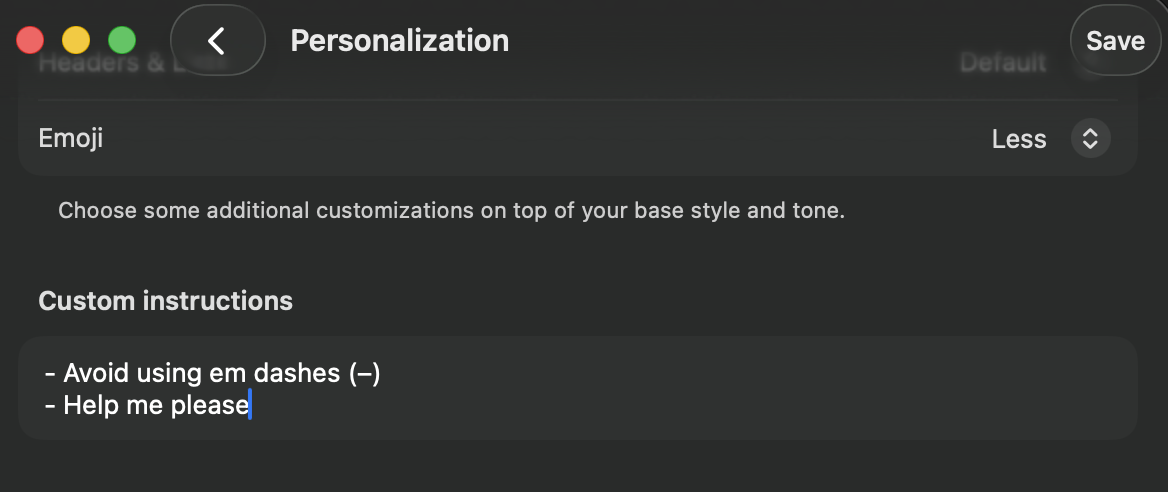
// === Slide 2.5: In the wild- ChatGPT personalisation ===
function Slide25() {
  return (
    <section className="slide" data-screen-label="21 In the Wild">
      <Chrome slide={22} total={33} sectionLabel="02 · CONTEXT LAYER" />
      <div className="slide-inner" style={{paddingTop:140}}>
        <p className="eyebrow">Working memory in the wild</p>
        <h2 className="title" style={{fontSize:60, marginBottom:14}}>You use this <span style={{color:'var(--red-3)'}}>everywhere</span>.</h2>
        <p className="subtitle" style={{fontSize:24, color:'var(--text-2)', marginTop:8, marginBottom:36, maxWidth:1300}}>
          The world's biggest chat products ship working memory as their long-term memory primitive- same exact pattern, dressed up as a "personalisation" panel.
        </p>
        <div style={{display:'flex', gap:48, flex:1, alignItems:'stretch'}}>
          <div style={{flex:'0 0 540px', display:'flex', flexDirection:'column', gap:18}}>
            <ul className="bullets" style={{fontSize:18, gap:10}}>
              <li>
                <span>The "memory" / "personalisation" pane is just a markdown block.</span>
                <div className="tip">A small block of text the user (or the agent) edits. ChatGPT calls it personalisation. Claude.ai calls it the memory feature.</div>
              </li>
              <li>
                <span>It's injected right at the working-memory slot- top of the prompt, after the system instruction.</span>
                <div className="tip">Exactly the same insertion position we just walked through on the previous slide.</div>
              </li>
              <li>
                <span>Updated over time as you talk to it, or directly by you in settings.</span>
                <div className="tip">Claude.ai updates the block based on signals from the conversation. You can also open the panel and rewrite or delete entries directly.</div>
              </li>
              <li>
                <span>The world's biggest chat products shipped this as their <em>first</em> crack at long-term memory.</span>
                <div className="tip">Working memory is the simplest long-term memory primitive that actually works at scale. Both Anthropic and OpenAI started here for their consumer products.</div>
              </li>
            </ul>
          </div>
          <div style={{flex:1, display:'flex', flexDirection:'column', gap:14}}>
            <div style={{fontFamily:'JetBrains Mono', fontSize:12, color:'var(--text-3)', letterSpacing:'0.2em'}}>EXAMPLE · CHATGPT PERSONALISATION</div>
            <div style={{
              flex:1, minHeight:480,
              border:'1px solid var(--ink-5)', borderRadius:6,
              background:'var(--ink-2)', padding:18,
              display:'flex', alignItems:'center', justifyContent:'center',
            }}>
              <img src="media/chatgpt-personalisation-working-memory.png" alt="ChatGPT personalisation / working memory"
                   loading="eager" decoding="async"
                   style={{maxWidth:'100%', maxHeight:'100%', width:'auto', height:'auto', objectFit:'contain', display:'block'}}/>
            </div>
          </div>
        </div>
      </div>
    </section>
  );
}

// Compact prompt-slot row used in the semantic-recall flow viz.
function Slot({ tag, name, tagColor, body, dim, sub }) {
  return (
    <div style={{
      display:'flex', alignItems:'center', gap:12,
      padding:'10px 14px', background:'var(--ink-2)',
      border:'1px solid var(--ink-5)', borderRadius:4,
      opacity: dim ? 0.6 : 1,
      minWidth:0,
    }}>
      <span style={{fontFamily:'JetBrains Mono', fontSize:12, color:tagColor, letterSpacing:'0.18em', fontWeight:700, minWidth:34, flexShrink:0}}>
        {tag}
      </span>
      <span style={{fontFamily:'Inter Tight', fontSize:14, color:'var(--text-1)', flexShrink:0}}>
        {name}
      </span>
      {body && (
        <span style={{fontFamily:'JetBrains Mono', fontSize:11, color:'var(--text-3)', marginLeft:10, whiteSpace:'nowrap', overflow:'hidden', textOverflow:'ellipsis', minWidth:0}}>
          {body}
        </span>
      )}
      {sub && (
        <span style={{fontFamily:'JetBrains Mono', fontSize:11, color:'var(--text-3)', marginLeft:'auto', flexShrink:0}}>
          {sub}
        </span>
      )}
    </div>
  );
}

// Three-step semantic-recall flow: user msg → top-3 of 8 → SR slot.
function SemanticRecallSimpleViz() {
  const resetKey = useSlideResetKey();
  const speed = useAnimSpeed();
  const [phase, setPhase] = useState(0);
  useEffect(() => {
    setPhase(0);
    const ids = [
      setTimeout(() => setPhase(1), 800 / Math.max(0.05, speed)),
      setTimeout(() => setPhase(2), 1700 / Math.max(0.05, speed)),
      setTimeout(() => setPhase(3), 2700 / Math.max(0.05, speed)),
    ];
    return () => ids.forEach(clearTimeout);
  }, [resetKey, speed]);

  const PAST = [
    { text: "what's the area of a circle r=5?", match: false },
    { text: "what's the integral of x²?",       match: true  },
    { text: "what's 12 × 8?",                   match: false },
    { text: "derivative of sin(x)?",            match: true  },
    { text: "convert 5kg to pounds.",           match: false },
    { text: "what's the integral of sin(x)?",   match: true  },
    { text: "is 17 prime?",                     match: false },
    { text: "solve 2x + 5 = 11.",               match: false },
  ];

  return (
    <div style={{
      background:'var(--ink-2)', border:'1px solid var(--ink-5)', borderRadius:6,
      padding:'18px 18px', flex:1, display:'flex', flexDirection:'column', gap:10,
    }}>
      <div style={{
        fontFamily:'JetBrains Mono', fontSize:13, color:'var(--text-3)',
        letterSpacing:'0.2em', textAlign:'center',
      }}>↓ THREE STEPS · NEW MSG → TOP-3 OF 8 → SR SLOT</div>

      <div style={{display:'flex', gap:12, alignItems:'stretch', flex:1, minHeight:0}}>
        {/* STEP 1- prompt structure with NEW message highlighted */}
        <div style={{flex:'1 1 0', display:'flex', flexDirection:'column', gap:6, minWidth:0}}>
          <div style={{fontFamily:'JetBrains Mono', fontSize:12, color:'var(--red-3)', letterSpacing:'0.18em', fontWeight:600}}>1 · NEW MESSAGE ARRIVES</div>
          <div style={{
            flex:1, padding:'8px', background:'var(--ink-3)',
            border:'1px solid var(--ink-5)', borderRadius:4,
            display:'flex', flexDirection:'column', gap:4,
          }}>
            <Slot tag="SYS" name="System Instruction" tagColor="var(--sec-4)" body="You are mathAgent." dim/>
            <Slot tag="WM" name="Working Memory" tagColor="var(--sec-2)" body="Sam · Berlin · CET" dim/>
            <Slot tag="SR" name="Semantic Recall" tagColor="var(--sec-3)" body="(empty- not queried yet)" dim/>
            <Slot tag="HX" name="History" tagColor="var(--text-2)" body="last 4 turns" dim/>
            {/* NEW- highlighted */}
            <div style={{
              padding:'10px 14px',
              background:'#3a1c1a',
              border:'1px solid var(--red-3)',
              borderRadius:4,
              boxShadow: phase >= 1 ? '0 0 16px rgba(196,48,48,0.45)' : 'none',
              display:'flex', flexDirection:'column', gap:7,
              transition:'all 0.4s',
            }}>
              <div style={{display:'flex', alignItems:'center', gap:12}}>
                <span style={{fontFamily:'JetBrains Mono', fontSize:12, color:'var(--red-3)', letterSpacing:'0.18em', fontWeight:700, minWidth:34}}>NEW</span>
                <span style={{fontFamily:'Inter Tight', fontSize:14, color:'var(--text-0)', fontWeight:600}}>Latest User Message</span>
              </div>
              <div style={{
                marginLeft:46, padding:'8px 12px',
                background:'#5a3a2c', color:'#f5ebe6',
                borderRadius:'10px 10px 10px 3px',
                fontFamily:'Inter Tight', fontSize:14, lineHeight:1.35,
              }}>"what's the integral of cos(x)?"</div>
            </div>
          </div>
        </div>

        {/* arrow 1 */}
        <div style={{display:'flex', alignItems:'center'}}>
          <span style={{
            fontSize:30, color: phase >= 1 ? 'var(--red-3)' : 'var(--text-3)',
            transition:'color 0.3s',
          }}>→</span>
        </div>

        {/* STEP 2- list of 8 past messages, 3 highlighted */}
        <div style={{flex:'0 0 250px', display:'flex', flexDirection:'column', gap:8, minWidth:0}}>
          <div style={{fontFamily:'JetBrains Mono', fontSize:12, color:'var(--sec-3)', letterSpacing:'0.18em', fontWeight:600}}>2 · TOP-3 OF 8</div>
          <div style={{
            flex:1, padding:'10px 12px', background:'var(--ink-3)',
            border:'1px solid var(--ink-5)', borderRadius:4,
            display:'flex', flexDirection:'column', gap:5,
            overflow:'hidden',
          }}>
            {PAST.map((m, i) => {
              const lit = phase >= 2 && m.match;
              return (
                <div key={i} style={{
                  flex:1,
                  padding:'7px 11px',
                  background: lit ? '#3a3a1c' : 'var(--ink-2)',
                  border: '1px solid ' + (lit ? 'var(--sec-3)' : 'var(--ink-5)'),
                  borderRadius:3,
                  fontFamily:'Inter Tight', fontSize:13,
                  color: lit ? '#e5c050' : 'var(--text-2)',
                  fontWeight: lit ? 600 : 400,
                  boxShadow: lit ? '0 0 10px rgba(201,162,39,0.4)' : 'none',
                  transition:'all 0.4s',
                  display:'flex', alignItems:'center', gap:8,
                  whiteSpace:'nowrap', overflow:'hidden', textOverflow:'ellipsis',
                }}>
                  <span style={{
                    fontFamily:'JetBrains Mono', fontSize:11,
                    color: lit ? 'var(--sec-3)' : 'var(--text-3)',
                    flexShrink:0,
                  }}>
                    {lit ? '★' : '○'}
                  </span>
                  <span style={{whiteSpace:'nowrap', overflow:'hidden', textOverflow:'ellipsis'}}>{m.text}</span>
                </div>
              );
            })}
          </div>
        </div>

        {/* arrow 2 */}
        <div style={{display:'flex', alignItems:'center'}}>
          <span style={{
            fontSize:30, color: phase >= 3 ? 'var(--sec-3)' : 'var(--text-3)',
            transition:'color 0.3s',
          }}>→</span>
        </div>

        {/* STEP 3- assembled prompt + agent response */}
        <div style={{flex:'1 1 0', display:'flex', flexDirection:'column', gap:6, minWidth:0}}>
          <div style={{fontFamily:'JetBrains Mono', fontSize:12, color:'var(--sec-3)', letterSpacing:'0.18em', fontWeight:600}}>3 · ASSEMBLED INTO mathAgent's PROMPT</div>
          <div style={{
            flex:1, padding:'8px', background:'var(--ink-3)',
            border:'1px solid var(--ink-5)', borderRadius:4,
            display:'flex', flexDirection:'column', gap:4,
            opacity: phase >= 3 ? 1 : 0.55, transition:'all 0.4s',
          }}>
            <Slot tag="SYS" name="System Instruction" tagColor="var(--sec-4)" body="You are mathAgent." dim/>
            <Slot tag="WM" name="Working Memory" tagColor="var(--sec-2)" body="Sam · Berlin · CET" dim/>
            {/* SR- highlighted, contains the 3 retrieved messages */}
            <div style={{
              padding:'10px 14px',
              background:'#1a2620',
              border:'1px solid var(--sec-3)',
              borderRadius:4,
              boxShadow: phase >= 3 ? '0 0 16px rgba(74,144,164,0.35)' : 'none',
              display:'flex', flexDirection:'column', gap:7,
              transition:'all 0.4s',
            }}>
              <div style={{display:'flex', alignItems:'center', gap:12}}>
                <span style={{fontFamily:'JetBrains Mono', fontSize:12, color:'var(--sec-3)', letterSpacing:'0.18em', fontWeight:700, minWidth:34}}>SR</span>
                <span style={{fontFamily:'Inter Tight', fontSize:14, color:'var(--text-0)', fontWeight:600}}>Semantic Recall</span>
                <span style={{fontFamily:'JetBrains Mono', fontSize:11, color:'var(--sec-3)', marginLeft:'auto'}}>top-3 inserted</span>
              </div>
              {phase >= 3 && PAST.filter(m => m.match).map((m, i) => (
                <div key={i} style={{
                  padding:'6px 11px', marginLeft:46,
                  background:'var(--ink-2)', border:'1px solid var(--sec-3)',
                  borderRadius:3,
                  fontFamily:'Inter Tight', fontSize:13, color:'var(--text-1)',
                  whiteSpace:'nowrap', overflow:'hidden', textOverflow:'ellipsis',
                }}>★ {m.text}</div>
              ))}
            </div>
            <Slot tag="HX" name="History" tagColor="var(--text-2)" body="last 4 turns" dim/>
            {/* NEW- the question, with bubble */}
            <div style={{
              padding:'10px 14px',
              background:'#3a1c1a',
              border:'1px solid var(--red-3)',
              borderRadius:4,
              display:'flex', flexDirection:'column', gap:7,
            }}>
              <div style={{display:'flex', alignItems:'center', gap:12}}>
                <span style={{fontFamily:'JetBrains Mono', fontSize:12, color:'var(--red-3)', letterSpacing:'0.18em', fontWeight:700, minWidth:34}}>NEW</span>
                <span style={{fontFamily:'Inter Tight', fontSize:14, color:'var(--text-0)', fontWeight:600}}>Latest User Message</span>
              </div>
              <div style={{
                marginLeft:46, padding:'8px 12px',
                background:'#5a3a2c', color:'#f5ebe6',
                borderRadius:'10px 10px 10px 3px',
                fontFamily:'Inter Tight', fontSize:14, lineHeight:1.35,
              }}>"what's the integral of cos(x)?"</div>
            </div>
            {/* Agent response- appears after assembly, inside the prompt area */}
            {phase >= 3 && (
              <div style={{
                marginTop:6, padding:'10px 14px',
                background:'#3a4a3a', color:'#f5ebe6',
                borderRadius:'10px 10px 3px 10px', alignSelf:'flex-end',
                maxWidth:'92%',
                fontFamily:'Inter Tight', fontSize:14, lineHeight:1.4,
                boxShadow:'0 2px 8px rgba(0,0,0,0.35)',
              }}>
                <div style={{fontFamily:'JetBrains Mono', fontSize:11, color:'#bfd6c0', letterSpacing:'0.2em', marginBottom:4, fontWeight:600}}>mathAgent</div>
                ∫cos(x) dx = sin(x) + C
              </div>
            )}
          </div>
        </div>
      </div>
    </div>
  );
}

// === Slide 2.6: Semantic recall ===
function Slide26() {
  const resetKey = useSlideResetKey();
  const [phase, setPhase] = useState(0);
  const speed = useAnimSpeed();
  useEffect(() => {
    setPhase(0);
    const ids = [
      setTimeout(() => setPhase(1), 700/speed),
      setTimeout(() => setPhase(2), 1500/speed),
      setTimeout(() => setPhase(3), 2400/speed),
    ];
    return () => ids.forEach(clearTimeout);
  }, [resetKey, speed]);

  return (
    <section className="slide" data-screen-label="22 Semantic Recall">
      <Chrome slide={23} total={33} sectionLabel="02 · CONTEXT LAYER" />
      <div className="slide-inner" style={{flexDirection:'column', gap:18, paddingTop:130}}>
        <div style={{display:'flex', alignItems:'flex-end', gap:40}}>
          <div style={{flex:'0 0 580px'}}>
            <p className="eyebrow">03 · semantic recall</p>
            <h2 className="title" style={{fontSize:48, lineHeight:1.05}}>RAG- but pointed at your past messages.</h2>
          </div>
          <div className="code" style={{flex:1, fontSize:12}}>
            <div className="code-header">MEMORY · ATTACHED TO mathAgent</div>
            <div className="code-body" dangerouslySetInnerHTML={{__html:
              `<span class="kw">const</span> <span class="ty">memory</span> = <span class="kw">new</span> <span class="ty">Memory</span>({
  <span class="ty">storage</span>: <span class="kw">new</span> <span class="ty">LibSQLStore</span>({...}), <span class="ty">vector</span>: <span class="kw">new</span> <span class="ty">LibSQLVector</span>({...}),
  <span class="ty">embedder</span>: <span class="ty">'openai/text-embedding-3-small'</span>,
  <span class="ty">options</span>: { <span class="ty">semanticRecall</span>: { <span class="ty">topK</span>: <span class="str">3</span>, <span class="ty">messageRange</span>: <span class="str">2</span>, <span class="ty">scope</span>: <span class="str">'resource'</span> } },
})
<span class="ty">mathAgent</span>.<span class="ty">memory</span> = <span class="ty">memory</span>`
            }}/>
          </div>
        </div>

        <div style={{display:'flex', gap:36, flex:1}}>
          <div style={{flex:'0 0 580px'}}>
            <Bullets items={[
              { text: 'Vector search aimed at your own message store.', tip: "Every message that has ever been said in any conversation gets embedded into a vector store. The model then uses cosine similarity to fish out the few most relevant past messages." },
              { text: 'Every turn, the new message gets embedded and queried for top-K matches.', tip: "Embedding happens automatically. You configure topK (how many matches) and messageRange (how much surrounding context comes with each match)." },
              { text: 'Matches get prepended ahead of conversation history.', tip: "Inserted between Working Memory and Conversation History- earlier in the prompt, not at the end." },
              { text: 'Default-on in Mastra. libSQL out of the box, swap to anything.', tip: "Pinecone, Postgres, Turbopuffer, Qdrant- Mastra abstracts the vector store. You only ever write the topK and messageRange numbers." },
              { text: 'Same caching problem as working memory- bigger, actually.', warn: true, tip: "Top-K matches change every turn, which means the prefix mutates every turn- same cache disaster as working memory." },
            ]}/>
          </div>

          <div style={{flex:1, display:'flex', flexDirection:'column', gap:18}}>
            <SemanticRecallSimpleViz/>
          </div>
        </div>
      </div>
    </section>
  );
}

// === Slide 2.7: Same problem, but bigger ===
function Slide27() {
  return (
    <section className="slide" data-screen-label="23 Same Problem">
      <Chrome slide={24} total={33} sectionLabel="02 · CONTEXT LAYER" />
      <div className="slide-inner" style={{justifyContent:'center', alignItems:'center', textAlign:'center'}}>
        <p className="eyebrow" style={{textAlign:'center'}}>Three subsystems. One disease.</p>
        <h2 className="title" style={{fontSize:64, color:'var(--text-0)', maxWidth:1500, margin:'0 auto 12px'}}>
          They all share <span style={{color:'var(--red-3)'}}>one expensive problem.</span>
        </h2>
        <p className="subtitle" style={{fontSize:22, color:'var(--text-2)', margin:'0 auto 52px', maxWidth:1300, lineHeight:1.45}}>
          Message history evicts old turns. Working memory rewrites itself every turn. Semantic recall pulls different top-K matches every turn. <span style={{color:'var(--red-3)', fontStyle:'italic'}}>And the cache notices all three.</span>
        </p>
        <div style={{display:'flex', gap:64, alignItems:'flex-start', justifyContent:'center'}}>
          {[
            { tag: 'HX', label: 'Message History', sub: 'oldest turns evicted past lastMessages cap' },
            { tag: 'WM', label: 'Working Memory',  sub: 'agent rewrites the markdown block in place' },
            { tag: 'SR', label: 'Semantic Recall', sub: 'top-K matches change every turn' },
          ].map((s, i) => (
            <div key={i} style={{position:'relative', maxWidth:300}}>
              <div style={{
                width:160, height:160, borderRadius:'50%',
                background:'var(--ink-2)', border:'2px solid var(--red-3)',
                display:'flex', alignItems:'center', justifyContent:'center',
                fontFamily:'JetBrains Mono', fontSize:36, color:'var(--text-0)', fontWeight:600,
                boxShadow:'0 0 32px rgba(196,48,48,0.32)',
                margin:'0 auto',
              }}>{s.tag}</div>
              <div style={{
                position:'absolute', top:-30, left:'50%', transform:'translateX(-50%)',
                fontSize:32, color:'#ffaa6a',
                textShadow:'0 0 14px rgba(255,170,106,0.85)',
              }}>⚠</div>
              <div style={{textAlign:'center', marginTop:16, fontFamily:'JetBrains Mono', fontSize:14, color:'var(--text-1)', letterSpacing:'0.1em', fontWeight:600}}>
                {s.label}
              </div>
              <div style={{textAlign:'center', marginTop:6, fontFamily:'Inter Tight', fontSize:14, color:'var(--text-2)', lineHeight:1.4, padding:'0 8px'}}>
                {s.sub}
              </div>
            </div>
          ))}
        </div>
        <p style={{
          marginTop:48, fontFamily:'JetBrains Mono', fontSize:14,
          color:'var(--text-3)', letterSpacing:'0.18em',
        }}>
          NEXT SLIDE · MUTATE THE PREFIX → BUST THE CACHE → PAY 10× FOR THE REST
        </p>
      </div>
    </section>
  );
}

// === Slide 2.8: Caching problem ===
function Slide28() {
  const resetKey = useSlideResetKey();
  const [mutating, setMutating] = useState([false, false]);
  const speed = useAnimSpeed();
  useEffect(() => {
    setMutating([false, false]);
    let i = 0;
    const id = setInterval(() => {
      i++;
      setMutating([i%2===1, i%3===2]);
    }, 1200/speed);
    return () => clearInterval(id);
  }, [resetKey, speed]);

  return (
    <section className="slide" data-screen-label="24 Caching Problem">
      <Chrome slide={25} total={33} sectionLabel="02 · CONTEXT LAYER" />
      <div className="slide-inner" style={{paddingTop:140}}>
        <p className="eyebrow">The caching problem revealed</p>
        <h2 className="title" style={{fontSize:56, marginBottom:24}}>
          Mutate the prefix → <span style={{color:'var(--red-3)'}}>bust the cache</span> → pay 10× for the rest.
        </h2>

        <div style={{display:'flex', gap:40, flex:1, marginTop:16}}>
          <div style={{flex:'0 0 720px'}}>
            <ContextStrip mutable={[false, mutating[0], mutating[1], false, true]} withSemantic={true}/>
            <div style={{marginTop:24}}>
              <Bullets items={[
                { text: 'A cache will work for the longest prefix that is identical to the most recent request.' },
                { text: 'Anything that mutates earlier in the prompt kills the cache for everything after it.' },
                { text: 'Working memory and semantic recall both sit early in the prompt- and both change every turn.' },
                { text: 'Cache reads cost roughly 10% of the input price.', tip: "Busting the cache means paying 10x for the rest of the prompt." },
              ]}/>
            </div>
          </div>

          <div style={{flex:1, display:'flex', flexDirection:'column', gap:16}}>
            <div style={{
              background:'var(--ink-2)', border:'1px solid var(--ink-5)', borderRadius:6,
              padding:24, fontFamily:'JetBrains Mono',
            }}>
              <div style={{fontSize:11, color:'var(--text-3)', letterSpacing:'0.2em', marginBottom:14}}>RUN THE NUMBERS · CLAUDE OPUS</div>
              <table style={{width:'100%', borderCollapse:'collapse', fontSize:14, color:'var(--text-1)'}}>
                <tbody>
                  <tr><td style={{padding:'4px 0'}}>List input price</td><td style={{textAlign:'right', color:'var(--text-0)'}}>$5.00 / M tok</td></tr>
                  <tr><td style={{padding:'4px 0', color:'#9bbf6a'}}>Cache reads</td><td style={{textAlign:'right', color:'#9bbf6a'}}>$0.50 / M (10%)</td></tr>
                  <tr><td style={{padding:'4px 0'}}>Cache writes (5m)</td><td style={{textAlign:'right'}}>$6.25 / M</td></tr>
                </tbody>
              </table>
              <hr style={{border:0, borderTop:'1px solid var(--ink-5)', margin:'14px 0'}}/>
              <div style={{fontSize:13, color:'var(--text-2)', lineHeight:1.6}}>
                150k tokens fully cached:<br/>
                <span style={{color:'#9bbf6a', fontSize:18}}>150k × $0.50/M = <strong>$0.075</strong>/turn</span>
              </div>
              <div style={{fontSize:13, color:'var(--text-2)', lineHeight:1.6, marginTop:14}}>
                Compress to 75k → fresh, uncached:<br/>
                <span style={{color:'var(--red-4)', fontSize:18}}>75k × $5.00/M = <strong>$0.375</strong>/turn</span>
              </div>
              <div style={{
                marginTop:16, padding:'10px 12px',
                background:'rgba(196,48,48,0.18)', borderLeft:'3px solid var(--red-3)',
                fontSize:14, color:'var(--text-0)',
              }}>
                Compression made it <strong style={{color:'var(--red-glow)'}}>5× more expensive</strong>.
              </div>
              <div style={{
                marginTop:10, padding:'10px 12px',
                background:'var(--ink-3)', border:'1px solid var(--ink-5)',
                fontSize:13, color:'var(--text-2)',
              }}>
                Break-even line: 150k cached = 15k uncached.<br/>
                Anything &gt; 15k uncached costs more than just keeping the original.
              </div>
            </div>
            <div style={{
              padding:'14px 18px', background:'var(--ink-3)', borderLeft:'3px solid var(--red-3)', borderRadius:4,
              fontSize:14, lineHeight:1.5, color:'var(--text-1)',
            }}>
              <div style={{fontFamily:'JetBrains Mono', fontSize:10, color:'var(--red-3)', letterSpacing:'0.2em', marginBottom:6}}>※ TIDBIT</div>
              Every "wrap Claude in a UI" tool you've heard of has been caught quietly burning users' subscription quotas faster than Claude.ai itself- almost always because they re-inject system prompt content dynamically and bust the cache. Anthropic keeps trying to ban these wrappers and a real part of why is exactly this.
            </div>
          </div>
        </div>
      </div>
    </section>
  );
}

// === Slide 2.9: Observational memory- step-by-step ===
function Slide29() {
  const resetKey = useSlideResetKey();
  const speed = useAnimSpeed();
  const [step, setStep] = useState(0);
  useEffect(() => {
    setStep(0);
    const id = setInterval(() => setStep(s => (s + 1) % 5), 1800 / Math.max(0.05, speed));
    return () => clearInterval(id);
  }, [resetKey, speed]);

  return (
    <section className="slide" data-screen-label="25 Observational Memory">
      <Chrome slide={26} total={33} sectionLabel="02 · CONTEXT LAYER" />
      <div className="slide-inner" style={{flexDirection:'column', gap:14, paddingTop:118}}>
        <div>
          <p className="eyebrow">04 · observational memory</p>
          <h2 className="title" style={{fontSize:42, lineHeight:1.05, marginBottom:6}}>
            Raw turns get replaced by a timestamped note log.
            <span style={{color:'var(--text-2)', fontSize:24, fontWeight:500, display:'block', marginTop:4}}>An Observer rewrites old turns into dense markdown. A Reflector condenses the log. The prefix stays cache-stable.</span>
          </h2>
        </div>

        <div style={{display:'flex', gap:32, flex:1, minHeight:0}}>
          <div style={{flex:'0 0 480px'}}>
            <Bullets items={[
              { text: 'The Observer is a separate cheap LLM that reads the live transcript and rewrites old turns as a timestamped markdown log.', tip: "Default model is gemini-2.5-flash. It runs on a background loop, not in the main agent's turn- the user never waits for it." },
              { text: 'The Reflector is a second cheap LLM that reads the Observer\'s log and condenses it into cross-cutting patterns and long-term facts.', tip: "Fires when the observation log itself crosses 40k tokens. Combines related observations, drops noise, and writes denser meta-summaries." },
              { text: 'Both logs are injected into the prompt as a single system message at the prefix top- replacing the raw turns they summarize.', tip: "Mastra's docs: 'corresponding raw messages are removed from the context window.' One system block, prepended once, carries everything those turns used to. That's what keeps the prefix cache-stable." },
              { text: 'Each note carries a date + time + 🔴/🟡 severity, and idle gaps insert a temporal marker so the agent still knows when things happened.', tip: "Temporally grounded- even after raw turns are gone, the agent reads 'after a 2h gap' and reasons about timing. activateAfterIdle: 5m aligns the run with cache TTL." },
            ]}/>
          </div>

          {/* === Option A: chat thread → Observer rewrites turns → Reflector condenses === */}
          <div style={{flex:1, display:'flex', flexDirection:'column', gap:10, minHeight:0}}>
            <div style={{fontFamily:'JetBrains Mono', fontSize:11, color:'var(--text-3)', letterSpacing:'0.2em'}}>
              ↓ TIMELINE- WHEN EACH AGENT FIRES, WHEN EACH BLOCK LANDS IN THE PROMPT
            </div>
            <div style={{display:'flex', gap:6}}>
              {[
                { trig:'live',                  act:'1 · turns growing',         tokens:'12k tokens' },
                { trig:'msgs > 30k',            act:'2 · OBSERVER reads log',    tokens:'observer running in bg' },
                { trig:'+5m idle (cache TTL)',  act:'3 · log INJECTED · raw cleared', tokens:'system msg lands at prompt top' },
                { trig:'user resumes after 2h', act:'4 · gap marker injected',   tokens:'temporal anchor preserved' },
                { trig:'obs log > 40k',         act:'5 · REFLECTOR condenses',   tokens:'system msg rewritten in place' },
              ].map((s, i) => {
                const active = step === i;
                const past = step > i;
                return (
                  <div key={i} style={{
                    flex:1,
                    padding:'5px 7px',
                    background: active ? '#2c2a1a' : (past ? '#1a2620' : 'var(--ink-3)'),
                    border:'1px solid ' + (active ? 'var(--sec-3)' : (past ? 'var(--sec-5)' : 'var(--ink-5)')),
                    borderRadius:3,
                    fontFamily:'JetBrains Mono', fontSize:8.5, letterSpacing:'0.08em',
                    transition:'all 0.3s',
                    display:'flex', flexDirection:'column', gap:2,
                  }}>
                    <div style={{
                      color: active ? 'var(--sec-3)' : (past ? 'var(--sec-5)' : 'var(--text-3)'),
                      fontWeight:700, fontSize:8.5, letterSpacing:'0.12em',
                    }}>{s.act.toUpperCase()}</div>
                    <div style={{color: active ? 'var(--text-1)' : 'var(--text-3)', fontSize:8, opacity:0.85}}>
                      trigger: {s.trig}
                    </div>
                    <div style={{color: active ? 'var(--text-2)' : 'var(--text-3)', fontSize:7.5, opacity:0.7}}>
                      {s.tokens}
                    </div>
                  </div>
                );
              })}
            </div>

            <div style={{
              flex:1, position:'relative', minHeight:0,
              background:'var(--ink-2)', border:'1px solid var(--ink-5)', borderRadius:6,
              padding:14, display:'flex', gap:14,
            }}>
              {/* Left side- the prompt the agent sees */}
              <div style={{flex:1, display:'flex', flexDirection:'column', gap:6, minWidth:0}}>
                <div style={{fontFamily:'JetBrains Mono', fontSize:9, color:'var(--text-3)', letterSpacing:'0.18em'}}>
                  ── PROMPT TOP ──
                </div>

                {/* Observation block- slides in at step >= 2, condenses at step 4. Styled as a system-message bubble. */}
                <div style={{
                  alignSelf:'center',
                  width:'94%',
                  maxHeight: step >= 2 ? 260 : 0,
                  opacity: step >= 2 ? 1 : 0,
                  overflow:'hidden',
                  transition:'all 0.5s ease',
                  background: step >= 4 ? '#2c2a1a' : '#1a2a32',
                  border:'1px solid ' + (step >= 4 ? 'var(--sec-3)' : 'var(--sec-5)'),
                  borderRadius:10,
                  padding: step >= 2 ? '9px 13px' : '0 13px',
                  boxShadow: step >= 4 ? '0 0 14px rgba(201,162,39,0.3)' : '0 0 14px rgba(74,144,164,0.25)',
                  color:'#f5ebe6',
                }}>
                  <div style={{
                    fontFamily:'JetBrains Mono', fontSize:8.5, letterSpacing:'0.18em', fontWeight:600,
                    color: step >= 4 ? 'var(--sec-3)' : 'var(--sec-5)',
                    marginBottom:5,
                    display:'flex', justifyContent:'space-between', gap:10,
                  }}>
                    <span>{step >= 4 ? 'SYSTEM · REFLECTIONS' : 'SYSTEM · OBSERVATIONS'}</span>
                    <span style={{opacity:0.7}}>
                      {step >= 4
                        ? 'rewritten 12:14- obs log hit 40k · system msg replaced in-place'
                        : 'injected 09:46- 5m after last user msg · system msg at prompt top'}
                    </span>
                  </div>
                  {step >= 4 ? (
                    <div style={{fontFamily:'JetBrains Mono', fontSize:10.5, lineHeight:1.55}}>
                      <div><span style={{color:'#e06c5a'}}>🔴</span> Shipping a Next.js + Supabase auth project tomorrow- high urgency, prod-bound</div>
                      <div style={{marginTop:3}}><span style={{color:'#e5c050'}}>🟡</span> Prefers tactical, code-level answers in short bursts; not looking for tutorials</div>
                      <div style={{marginTop:3}}><span style={{color:'#e5c050'}}>🟡</span> Working from Berlin (CET) · expect afternoon-EU activity windows</div>
                      <div style={{marginTop:3}}><span style={{color:'#e5c050'}}>🟡</span> Pattern: starts broad, then drills into one route (/admin) at a time</div>
                    </div>
                  ) : (
                    <div style={{fontFamily:'JetBrains Mono', fontSize:10.5, lineHeight:1.55}}>
                      <div><span style={{color:'#e06c5a'}}>🔴</span> 09:14 Building Next.js app with Supabase auth, ships tomorrow</div>
                      <div style={{paddingLeft:14, marginTop:2}}><span style={{color:'#e5c050'}}>🟡</span> 09:18 Recommended middleware.ts with matcher config</div>
                      <div style={{paddingLeft:14, marginTop:2}}><span style={{color:'#e5c050'}}>🟡</span> 09:22 Wants stricter rules on /admin route</div>
                      <div style={{paddingLeft:14, marginTop:2}}><span style={{color:'#e5c050'}}>🟡</span> 09:30 Added a role check on the session object</div>
                      <div style={{paddingLeft:14, marginTop:2}}><span style={{color:'#e5c050'}}>🟡</span> 09:41 User confirmed they are in Berlin (CET) timezone</div>
                    </div>
                  )}
                </div>

                {/* Raw turns 1-5- visible at step 0-1, fade out at step 2 */}
                <div style={{
                  display:'flex', flexDirection:'column', gap:6,
                  maxHeight: step >= 2 ? 0 : 280,
                  opacity: step >= 2 ? 0 : 1,
                  overflow:'hidden',
                  transition:'all 0.5s ease',
                  outline: step === 1 ? '1px dashed var(--sec-5)' : 'none',
                  outlineOffset: 6,
                  borderRadius: 6,
                  padding: '2px 0',
                }}>
                  {[
                    { who:'U', t:'09:14', msg:'help me set up Supabase auth in Next.js, shipping tomorrow' },
                    { who:'A', t:'09:18', msg:'use middleware.ts- here\'s the matcher config…' },
                    { who:'U', t:'09:22', msg:'make it stricter for /admin' },
                    { who:'A', t:'09:30', msg:'add a role check on the session…' },
                    { who:'U', t:'09:41', msg:'btw I\'m in Berlin tz' },
                  ].map((m, i) => {
                    const isAssistant = m.who === 'A';
                    return (
                      <div key={i} style={{
                        alignSelf: isAssistant ? 'flex-start' : 'flex-end',
                        maxWidth:'82%',
                        padding:'7px 12px',
                        background: isAssistant ? '#3a4a3a' : '#5a3a2c',
                        color:'#f5ebe6',
                        borderRadius: isAssistant ? '12px 12px 12px 3px' : '12px 12px 3px 12px',
                        fontFamily:'Inter Tight', fontSize:12.5, lineHeight:1.35,
                        boxShadow:'0 2px 6px rgba(0,0,0,0.3)',
                      }}>
                        <div style={{
                          fontFamily:'JetBrains Mono', fontSize:8.5, letterSpacing:'0.18em',
                          color: isAssistant ? '#bfd6c0' : '#f5d6c0', fontWeight:600, marginBottom:2,
                          display:'flex', justifyContent:'space-between', gap:10,
                        }}>
                          <span>{isAssistant ? 'mathAgent' : 'USER'}</span>
                          <span style={{opacity:0.7}}>{m.t}</span>
                        </div>
                        {m.msg}
                      </div>
                    );
                  })}
                </div>

                {/* Temporal gap marker */}
                <div style={{
                  textAlign:'center',
                  fontFamily:'JetBrains Mono', fontSize:10,
                  color: step >= 3 ? 'var(--sec-3)' : 'var(--text-3)',
                  letterSpacing:'0.18em',
                  padding:'4px 0',
                  opacity: step >= 3 ? 1 : 0.3,
                  transition:'all 0.4s',
                }}>
                  {step >= 3 ? '— ⏱ 2h 27m gap —' : '— · —'}
                </div>

                {/* Recent raw turns- always present */}
                <div style={{display:'flex', flexDirection:'column', gap:6}}>
                  <div style={{fontFamily:'JetBrains Mono', fontSize:9, color:'var(--red-4)', letterSpacing:'0.15em'}}>
                    ◆ RECENT · KEPT VERBATIM
                  </div>
                  {[
                    { who:'U', t:'12:08', msg:'ok back, ready to ship- what\'s the deploy gotcha?' },
                    { who:'A', t:'12:10', msg:'session refresh on the edge runtime…' },
                  ].map((m, i) => {
                    const isAssistant = m.who === 'A';
                    return (
                      <div key={i} style={{
                        alignSelf: isAssistant ? 'flex-start' : 'flex-end',
                        maxWidth:'82%',
                        padding:'7px 12px',
                        background: isAssistant ? '#3a4a3a' : '#5a3a2c',
                        color:'#f5ebe6',
                        borderRadius: isAssistant ? '12px 12px 12px 3px' : '12px 12px 3px 12px',
                        fontFamily:'Inter Tight', fontSize:12.5, lineHeight:1.35,
                        boxShadow:'0 2px 6px rgba(0,0,0,0.3)',
                      }}>
                        <div style={{
                          fontFamily:'JetBrains Mono', fontSize:8.5, letterSpacing:'0.18em',
                          color: isAssistant ? '#bfd6c0' : '#f5d6c0', fontWeight:600, marginBottom:2,
                          display:'flex', justifyContent:'space-between', gap:10,
                        }}>
                          <span>{isAssistant ? 'mathAgent' : 'USER'}</span>
                          <span style={{opacity:0.7}}>{m.t}</span>
                        </div>
                        {m.msg}
                      </div>
                    );
                  })}
                </div>
              </div>

              {/* Right side- the agents doing the work */}
              <div style={{flex:'0 0 130px', display:'flex', flexDirection:'column', gap:10, justifyContent:'flex-start'}}>
                <div style={{fontFamily:'JetBrains Mono', fontSize:9, color:'var(--text-3)', letterSpacing:'0.18em'}}>
                  ── BACKGROUND ──
                </div>
                <div style={{
                  padding:'10px 8px', textAlign:'center',
                  background: step === 1 ? '#1a2a32' : 'var(--ink-3)',
                  border:'2px solid var(--sec-5)',
                  borderRadius:4,
                  boxShadow: step === 1 ? '0 0 16px rgba(74,144,164,0.7)' : 'none',
                  transition:'all 0.4s',
                }}>
                  <div style={{fontFamily:'JetBrains Mono', fontSize:11, color:'var(--sec-5)', fontWeight:700, letterSpacing:'0.1em'}}>OBSERVER</div>
                  <div style={{fontFamily:'JetBrains Mono', fontSize:8, color:'var(--text-3)', marginTop:3, lineHeight:1.3}}>
                    fires when<br/>msgs &gt; 30k
                  </div>
                  <div style={{fontFamily:'JetBrains Mono', fontSize:9, color: step === 1 ? 'var(--sec-3)' : (step >= 2 ? 'var(--sec-5)' : 'var(--text-3)'), marginTop:6, fontWeight: step === 1 ? 700 : 500}}>
                    {step === 0 ? 'IDLE' : step === 1 ? 'REWRITING…' : step === 2 ? 'INJECTED ✓' : 'cached'}
                  </div>
                </div>
                <div style={{
                  padding:'10px 8px', textAlign:'center',
                  background: step === 4 ? '#2c2a1a' : 'var(--ink-3)',
                  border:'2px solid var(--sec-3)',
                  borderRadius:4,
                  boxShadow: step === 4 ? '0 0 16px rgba(201,162,39,0.6)' : 'none',
                  transition:'all 0.4s',
                }}>
                  <div style={{fontFamily:'JetBrains Mono', fontSize:11, color:'var(--sec-3)', fontWeight:700, letterSpacing:'0.1em'}}>REFLECTOR</div>
                  <div style={{fontFamily:'JetBrains Mono', fontSize:8, color:'var(--text-3)', marginTop:3, lineHeight:1.3}}>
                    fires when<br/>obs log &gt; 40k
                  </div>
                  <div style={{fontFamily:'JetBrains Mono', fontSize:9, color: step === 4 ? 'var(--sec-3)' : 'var(--text-3)', marginTop:6, fontWeight: step === 4 ? 700 : 500}}>
                    {step < 4 ? 'IDLE' : 'CONDENSING…'}
                  </div>
                </div>
                <div style={{
                  marginTop:6, padding:'8px', borderRadius:3,
                  background:'var(--ink-3)', border:'1px solid var(--ink-5)',
                  fontFamily:'JetBrains Mono', fontSize:9, color:'var(--text-2)', lineHeight:1.45,
                }}>
                  prefix stays untouched · cache survives
                </div>
              </div>
            </div>
          </div>
        </div>
      </div>
    </section>
  );
}

// === Slide 2.10: Auto-compaction in the wild ===
function Slide210() {
  return (
    <section className="slide" data-screen-label="26 Auto-Compaction">
      <Chrome slide={27} total={33} sectionLabel="02 · CONTEXT LAYER" />
      <div className="slide-inner" style={{paddingTop:140}}>
        <p className="eyebrow">Auto-compaction in the wild · observational memory's cousin</p>
        <h2 className="title" style={{fontSize:48, marginBottom:18}}>Claude Code and Codex both compact your context- <span style={{color:'var(--red-3)'}}>very differently.</span></h2>
        <p className="subtitle" style={{fontSize:20, color:'var(--text-2)', maxWidth:1500, lineHeight:1.45, marginBottom:28}}>
          Both products hit the same wall- the context window fills up- and both reach for compaction. Claude Code rewrites the whole transcript into a summary block. Codex keeps your messages verbatim and surgically prunes the tool noise around them.
        </p>
        <div style={{display:'flex', gap:32, flex:1}}>
          {/* Claude Code */}
          <div style={{flex:1, background:'var(--ink-2)', border:'1px solid var(--ink-5)', borderTop:'4px solid var(--red-3)', borderRadius:'4px 4px 6px 6px', padding:32, display:'flex', flexDirection:'column', gap:18}}>
            <div style={{display:'flex', alignItems:'baseline', gap:16}}>
              <h3 style={{fontSize:32, color:'var(--text-0)', margin:0}}>Claude Code</h3>
              <span style={{fontFamily:'JetBrains Mono', fontSize:12, color:'var(--red-3)', letterSpacing:'0.2em'}}>HEAVY EDITOR</span>
            </div>
            <p style={{fontSize:18, color:'var(--text-1)', lineHeight:1.5, margin:0}}>
              Wholesale rewrite. Entire message stream → one summary block + 5–10 file paths to keep referencing.
            </p>
            <div style={{flex:1, display:'flex', flexDirection:'column', gap:8, marginTop:8}}>
              <div style={{display:'flex', flexDirection:'column', gap:3}}>
                {[1,2,3,4,5,6,7,8].map(i => (
                  <div key={i} style={{height:14, background:'var(--ink-3)', border:'1px solid var(--ink-5)', borderLeft:`2px solid ${i%2?'var(--red-3)':'var(--text-3)'}`, borderRadius:1}}/>
                ))}
              </div>
              <div style={{textAlign:'center', fontSize:18, color:'var(--red-3)', margin:'4px 0'}}>↓</div>
              <div style={{padding:'12px 14px', background:'var(--red-deep)', border:'1px solid var(--red-3)', borderRadius:4, fontFamily:'JetBrains Mono', fontSize:13, color:'var(--text-0)', lineHeight:1.5}}>
                Summary: User debugging mastra memory module. Made 4 fixes to `Memory.ts`. Cache invalidation issue.
              </div>
              <div style={{padding:'10px 14px', background:'var(--ink-3)', border:'1px solid var(--ink-5)', borderRadius:4, fontFamily:'JetBrains Mono', fontSize:12, color:'var(--text-2)'}}>
                <div style={{fontSize:10, color:'var(--text-3)', marginBottom:6, letterSpacing:'0.15em'}}>FILES TO KEEP IN MEMORY</div>
                packages/memory/src/Memory.ts<br/>
                packages/memory/src/cache.ts<br/>
                packages/core/src/agent.ts
              </div>
            </div>
          </div>
          {/* Codex */}
          <div style={{flex:1, background:'var(--ink-2)', border:'1px solid var(--ink-5)', borderTop:'4px solid var(--sec-3)', borderRadius:'4px 4px 6px 6px', padding:32, display:'flex', flexDirection:'column', gap:18}}>
            <div style={{display:'flex', alignItems:'baseline', gap:16}}>
              <h3 style={{fontSize:32, color:'var(--text-0)', margin:0}}>Codex</h3>
              <span style={{fontFamily:'JetBrains Mono', fontSize:12, color:'var(--sec-3)', letterSpacing:'0.2em'}}>LIGHT EDITOR</span>
            </div>
            <p style={{fontSize:18, color:'var(--text-1)', lineHeight:1.5, margin:0}}>
              Surgical pruning. Old tool calls cut, some messages summarized in place. User inputs retained verbatim.
            </p>
            <div style={{flex:1, display:'flex', flexDirection:'column', gap:6, marginTop:8}}>
              <div style={{padding:'8px 12px', background:'var(--ink-3)', border:'1px solid var(--ink-5)', borderLeft:'2px solid var(--text-3)', borderRadius:2, fontFamily:'JetBrains Mono', fontSize:12, color:'var(--text-1)'}}>
                &lt;user&gt; debug the memory module
              </div>
              <div style={{padding:'8px 12px', background:'#1a2620', border:'1px solid #2a4a3a', borderLeft:'2px solid var(--sec-3)', borderRadius:2, fontFamily:'JetBrains Mono', fontSize:11, color:'#9bbf6a', fontStyle:'italic'}}>
                ⌗ summarized: 4 file reads, 2 grep calls
              </div>
              <div style={{padding:'8px 12px', background:'var(--ink-3)', border:'1px solid var(--ink-5)', borderLeft:'2px solid var(--text-3)', borderRadius:2, fontFamily:'JetBrains Mono', fontSize:12, color:'var(--text-1)'}}>
                &lt;user&gt; check the cache invalidation
              </div>
              <div style={{padding:'8px 12px', background:'#1a2620', border:'1px solid #2a4a3a', borderLeft:'2px solid var(--sec-3)', borderRadius:2, fontFamily:'JetBrains Mono', fontSize:11, color:'#9bbf6a', fontStyle:'italic'}}>
                ⌗ off-task: dropped (workflow tangent)
              </div>
              <div style={{padding:'8px 12px', background:'var(--ink-3)', border:'1px solid var(--ink-5)', borderLeft:'2px solid var(--red-3)', borderRadius:2, fontFamily:'JetBrains Mono', fontSize:12, color:'var(--text-0)'}}>
                &lt;user&gt; ok now look at lines 142-180
              </div>
            </div>
          </div>
        </div>
        <p style={{marginTop:18, fontSize:14, color:'var(--text-3)', fontStyle:'italic', textAlign:'center'}}>
          * Speculative- observed from transcripts post-compaction, not internal lab disclosure.
        </p>
      </div>
    </section>
  );
}

// === Slide 2.11: Bridge tidbit- Claude Code task system (extension to long-horizon agents talk) ===
function Slide211() {
  return (
    <section className="slide" data-screen-label="27 Task System Bridge">
      <Chrome slide={28} total={33} sectionLabel="02 · CONTEXT LAYER" />
      <div className="slide-inner" style={{paddingTop:130}}>
        <p className="eyebrow">Tidbit · extension to the long-horizon-agents talk before this one</p>
        <h2 className="title" style={{fontSize:48, marginBottom:14, lineHeight:1.05}}>
          How Claude Code keeps a coding agent on task <span style={{color:'var(--red-3)'}}>for hours.</span>
        </h2>
        <p className="subtitle" style={{fontSize:20, color:'var(--text-2)', maxWidth:1620, lineHeight:1.45, marginBottom:24}}>
          This is the technique that makes long-horizon coding agents possible. Claude Code ships a separate task system (<code style={{color:'var(--red-3)', fontFamily:'JetBrains Mono'}}>TodoWrite</code> / <code style={{color:'var(--red-3)', fontFamily:'JetBrains Mono'}}>TaskList</code>) that lives outside the chat stream- and gets re-injected on a timer so the model never forgets the plan.
        </p>

        <div style={{display:'flex', gap:28, flex:1, alignItems:'stretch'}}>
          {/* LEFT- gating logic + what doesn't happen + why it matters */}
          <div style={{flex:'0 0 580px', display:'flex', flexDirection:'column', gap:20, justifyContent:'center'}}>
            <div style={{
              padding:'24px 26px', background:'var(--ink-2)', border:'1px solid var(--ink-5)', borderRadius:6,
            }}>
              <div style={{fontFamily:'JetBrains Mono', fontSize:14, color:'var(--text-3)', letterSpacing:'0.2em', marginBottom:18}}>WHEN DOES THE REMINDER FIRE?</div>
              <div style={{display:'flex', gap:16, alignItems:'center'}}>
                <div style={{flex:1, padding:'18px 14px', background:'var(--ink-3)', border:'1px solid var(--ink-5)', borderRadius:4, textAlign:'center'}}>
                  <div style={{fontSize:12, color:'var(--text-3)', letterSpacing:'0.15em'}}>TURNS SINCE LAST TodoWrite</div>
                  <div style={{fontFamily:'JetBrains Mono', fontSize:46, color:'var(--red-4)', fontWeight:600, marginTop:6, lineHeight:1}}>≥ 10</div>
                </div>
                <div style={{fontSize:22, color:'var(--text-1)', fontWeight:700}}>OR</div>
                <div style={{flex:1, padding:'18px 14px', background:'var(--ink-3)', border:'1px solid var(--ink-5)', borderRadius:4, textAlign:'center'}}>
                  <div style={{fontSize:12, color:'var(--text-3)', letterSpacing:'0.15em'}}>TURNS SINCE LAST NUDGE</div>
                  <div style={{fontFamily:'JetBrains Mono', fontSize:46, color:'var(--red-4)', fontWeight:600, marginTop:6, lineHeight:1}}>≥ 10</div>
                </div>
              </div>
              <div style={{marginTop:16, textAlign:'center', fontFamily:'JetBrains Mono', fontSize:13, color:'var(--red-3)', letterSpacing:'0.15em'}}>
                ↓ THE WRAPPER INJECTS &lt;system-reminder&gt; ON THE NEXT TOOL RESULT
              </div>
            </div>

            <div style={{
              padding:'24px 26px', background:'var(--ink-2)', border:'1px solid var(--ink-5)', borderRadius:6,
            }}>
              <div style={{fontFamily:'JetBrains Mono', fontSize:14, color:'var(--text-3)', letterSpacing:'0.2em', marginBottom:14}}>WHAT DOESN'T HAPPEN</div>
              <ul style={{listStyle:'none', padding:0, margin:0, display:'flex', flexDirection:'column', gap:11}}>
                {[
                  'A task list automatically attached to every prompt',
                  'The entire task system stuffed into the model\'s earlier chat history',
                  'Any visible signal to the user that a reminder ever fired- it looks like a normal tool result',
                ].map((t, i) => (
                  <li key={i} style={{fontSize:16, color:'var(--text-1)', display:'flex', gap:12, lineHeight:1.45}}>
                    <span style={{color:'var(--red-3)', flexShrink:0}}>✗</span> {t}
                  </li>
                ))}
              </ul>
              <p style={{margin:'16px 0 0', fontSize:15, color:'var(--text-2)', fontStyle:'italic', lineHeight:1.5}}>
                The disk is the canonical store. The transcript is short-term memory. The reminder is the re-anchor.
              </p>
            </div>

            <div style={{
              padding:'22px 26px', background:'var(--ink-3)', border:'1px solid var(--ink-5)', borderRadius:6,
              fontSize:16, lineHeight:1.55, color:'var(--text-1)',
            }}>
              <div style={{fontFamily:'JetBrains Mono', fontSize:13, color:'var(--red-3)', letterSpacing:'0.2em', marginBottom:10}}>WHY IT MATTERS</div>
              Six-hour debugging session, auto-compaction wipes the transcript- the reminder re-anchors the model to the plan. <strong style={{color:'var(--text-0)'}}>That's how the agent stays coherent past the context window.</strong>
            </div>
          </div>

          {/* RIGHT- chat thread (USER → right, ASSISTANT → left), reminder smooshed onto a tool result mid-work */}
          <div style={{flex:1, display:'flex', flexDirection:'column', gap:14, minHeight:0}}>
            <div style={{fontFamily:'JetBrains Mono', fontSize:13, color:'var(--text-3)', letterSpacing:'0.2em'}}>
              ↓ WHAT THE MODEL ACTUALLY SEES IN ITS INPUT FEED
            </div>

            <div style={{
              flex:1, background:'var(--ink-2)', border:'1px solid var(--ink-5)', borderRadius:6,
              padding:18, display:'flex', flexDirection:'column', gap:12, overflow:'hidden',
            }}>
              {/* …earlier work elided… */}
              <div style={{
                alignSelf:'center',
                fontFamily:'JetBrains Mono', fontSize:11, color:'var(--text-3)', letterSpacing:'0.2em',
                padding:'2px 10px',
              }}>
                · · · 14 turns of refactor work elided · · ·
              </div>

              {/* ASSISTANT tool call (left) */}
              <div style={{
                alignSelf:'stretch', width:'auto',
                padding:'14px 18px', background:'#3a4a3a', color:'#f5ebe6',
                borderRadius:'12px 12px 12px 3px',
                fontFamily:'Inter Tight', fontSize:16, lineHeight:1.45,
                boxShadow:'0 2px 6px rgba(0,0,0,0.3)',
              }}>
                <div style={{fontFamily:'JetBrains Mono', fontSize:10, letterSpacing:'0.18em', color:'#bfd6c0', fontWeight:600, marginBottom:3}}>ASSISTANT · 09:42</div>
                Updating the charge handler now…<br/>
                <code style={{fontFamily:'JetBrains Mono', fontSize:13, color:'#fff'}}>tool_call: edit_file("payments.ts", patch)</code>
              </div>

              {/* TOOL RESULT (left, neutral)- reminder smooshed onto the bottom of the same message */}
              <div style={{
                alignSelf:'stretch', width:'auto',
                padding:'14px 18px', background:'var(--ink-3)', color:'var(--text-1)',
                border:'1px solid var(--ink-5)',
                borderRadius:'12px 12px 12px 3px',
                fontFamily:'JetBrains Mono', fontSize:13, lineHeight:1.55,
                boxShadow:'0 2px 6px rgba(0,0,0,0.3)',
              }}>
                <div style={{fontSize:10, letterSpacing:'0.18em', color:'var(--sec-3)', fontWeight:600, marginBottom:5}}>TOOL RESULT · edit_file</div>
                <div style={{color:'var(--text-2)'}}>
                  ✓ patched payments.ts (3 hunks applied, 0 conflicts)
                </div>

                {/* The reminder- verbatim from the leaked Claude Code source */}
                <div style={{
                  marginTop:9, padding:'10px 13px',
                  background:'rgba(232,80,80,0.08)',
                  border:'1px dashed var(--red-3)',
                  borderRadius:4,
                  fontSize:11, lineHeight:1.5, color:'var(--text-1)',
                  boxShadow:'0 0 12px rgba(232,80,80,0.18)',
                  whiteSpace:'pre-wrap',
                }}>
                  <div style={{fontSize:10, letterSpacing:'0.18em', color:'var(--red-3)', fontWeight:700, marginBottom:5, whiteSpace:'normal'}}>
                    &lt;system-reminder&gt; <span style={{color:'var(--text-3)', fontWeight:500, letterSpacing:'0.1em'}}>injected by the wrapper · verbatim from the leak</span>
                  </div>
{`The TodoWrite tool hasn't been used recently. If you're
working on tasks that would benefit from tracking progress,
consider using the TodoWrite tool. … `}<span style={{color:'var(--red-4)'}}>{`Make sure you NEVER
mention this reminder to the user`}</span>{`.

Here are the existing contents of your todo list:
[1. [pending] foo, 2. [in_progress] bar]
`}<div style={{color:'var(--text-3)'}}>&lt;/system-reminder&gt;</div>
                </div>
              </div>

              {/* ASSISTANT picks up the nudge (left) */}
              <div style={{
                alignSelf:'stretch', width:'auto',
                padding:'14px 18px', background:'#3a4a3a', color:'#f5ebe6',
                borderRadius:'12px 12px 12px 3px',
                fontFamily:'Inter Tight', fontSize:16, lineHeight:1.45,
                boxShadow:'0 2px 6px rgba(0,0,0,0.3)',
              }}>
                <div style={{fontFamily:'JetBrains Mono', fontSize:10, letterSpacing:'0.18em', color:'#bfd6c0', fontWeight:600, marginBottom:3}}>ASSISTANT · 09:43</div>
                Let me update the task list while I'm here…<br/>
                <code style={{fontFamily:'JetBrains Mono', fontSize:13, color:'#fff'}}>tool_call: TodoWrite(...)</code>
              </div>
            </div>

            <div style={{
              padding:'14px 18px', background:'var(--ink-3)', border:'1px solid var(--ink-5)', borderRadius:6,
              fontSize:15, lineHeight:1.55, color:'var(--text-1)',
            }}>
              <strong style={{color:'var(--text-0)'}}>The reminder is smooshed onto the latest tool result.</strong> The model reads it as if it were part of the tool's output- and the rule "<em style={{color:'var(--red-4)'}}>NEVER mention this reminder to the user</em>" keeps the nudge invisible.
            </div>
          </div>
        </div>
      </div>
    </section>
  );
}

// === Slide 2.12: File-based gist memory ===
function Slide212() {
  const cardBase = {
    background:'#0d0a09',
    border:'1px solid var(--ink-5)',
    borderRadius:6,
    overflow:'hidden',
    minHeight:238,
  };

  const cardHeader = {
    padding:'7px 12px',
    background:'var(--ink-3)',
    borderBottom:'1px solid var(--ink-5)',
    fontFamily:'JetBrains Mono',
    fontSize:10,
    letterSpacing:'0.18em',
    display:'flex',
    justifyContent:'space-between',
    gap:12,
  };

  const fileLine = { color:'var(--text-2)' };
  const loadedFile = {
    display:'flex',
    alignItems:'center',
    justifyContent:'space-between',
    gap:10,
    background:'rgba(217,119,87,0.12)',
    padding:'4px 8px',
    borderRadius:3,
    border:'1px solid var(--sec-2)',
  };

  const arrowStyle = {
    flex:'0 0 28px',
    display:'flex',
    alignItems:'center',
    justifyContent:'center',
    fontFamily:'JetBrains Mono',
    fontSize:22,
    color:'var(--text-3)',
  };

  const PromptStrip = ({ note }) => (
    <div style={{
      ...cardBase,
      flex:'0 0 315px',
      padding:'14px 14px 12px',
      background:'var(--ink-2)',
      display:'flex',
      flexDirection:'column',
      justifyContent:'center',
      gap:9,
    }}>
      <div style={{fontFamily:'JetBrains Mono', fontSize:10, color:'var(--text-3)', letterSpacing:'0.18em'}}>PROMPT STRUCTURE</div>
      <div style={{display:'flex', flexDirection:'column', gap:4}}>
        <div style={{padding:'7px 10px', background:'var(--ink-4)', fontFamily:'JetBrains Mono', fontSize:10, color:'var(--text-2)', letterSpacing:'0.1em'}}>system</div>
        <div style={{padding:'9px 10px', background:'var(--sec-2)', boxShadow:'0 0 12px rgba(217,119,87,0.55)', fontFamily:'JetBrains Mono', fontSize:11, color:'#1a1413', fontWeight:700, letterSpacing:'0.1em'}}>working memory</div>
        <div style={{padding:'7px 10px', background:'var(--ink-4)', fontFamily:'JetBrains Mono', fontSize:10, color:'var(--text-2)', letterSpacing:'0.1em'}}>tools</div>
        <div style={{padding:'7px 10px', background:'var(--ink-3)', border:'1px dashed var(--ink-5)', fontFamily:'JetBrains Mono', fontSize:10, color:'var(--text-3)', letterSpacing:'0.1em'}}>conversation history →</div>
      </div>
      <div style={{fontFamily:'Inter Tight', fontSize:12, color:'var(--text-2)', fontStyle:'italic', lineHeight:1.4}}>
        {note}
      </div>
    </div>
  );

  return (
    <section className="slide" data-screen-label="28 File-Based Gist">
      <Chrome slide={29} total={33} sectionLabel="02 · CONTEXT LAYER" />
      <div className="slide-inner" style={{paddingTop:104, paddingBottom:64}}>
        <div style={{display:'grid', gridTemplateColumns:'500px 1fr', gap:42, flex:1, alignItems:'stretch'}}>
          {/* LEFT- one stable narrative column */}
          <div style={{display:'flex', flexDirection:'column', justifyContent:'center', gap:28}}>
            <div>
              <p className="eyebrow" style={{marginTop:0, marginBottom:14}}>The emerging fifth · file-based gist memory</p>
              <h2 className="title" style={{fontSize:46, marginTop:0, marginBottom:0, lineHeight:1.05}}>
                Two products. <span style={{color:'var(--red-3)'}}>Same memory shape.</span>
              </h2>
            </div>
            <Bullets items={[
              { text: 'Working memory carries the index: one-line gists and links, not the whole memory store.', tip: "The always-loaded block stays small. It gives the agent a map of what exists without stuffing every full memory into the prompt." },
              { text: 'Progressive disclosure is the retrieval pattern: gist first; full file only when the agent decides it needs more.', tip: "Cheap by default, deep on demand. The agent sees a small hint, then uses its file tools to expand only the relevant memories." },
              { text: 'In my own setup, AGENTS.md is that index- bugs, architecture, and project context live in separate files.', tip: "AGENTS.md holds one-line gists with [link](path) entries pointing at .docs/learnings/* files. The agent only reads the full file when it predicts it'll be relevant." },
              { text: 'Claude Code productizes the same shape: MEMORY.md index, ≤5 sidecar-selected files per turn, extractor writes back at the end.', tip: "MEMORY.md is capped at 200 lines / 25KB. Topic files are capped separately, selected by a Sonnet sidecar, and updated by an extractMemories forked agent." },
            ]} />
          </div>

          {/* RIGHT- two matching comparison rows */}
          <div style={{display:'flex', flexDirection:'column', justifyContent:'center', gap:34, minWidth:0}}>
            {/* Personal setup row */}
            <div style={{display:'flex', flexDirection:'column', gap:8}}>
              <div style={{display:'flex', alignItems:'center', justifyContent:'space-between'}}>
                <div style={{fontFamily:'JetBrains Mono', fontSize:11, color:'var(--sec-2)', letterSpacing:'0.22em', fontWeight:600}}>
                  ↓ MY SETUP · AGENTS.md index
                </div>
                <div style={{fontFamily:'JetBrains Mono', fontSize:10, color:'var(--text-3)', letterSpacing:'0.16em'}}>
                  local index → prompt prefix → lazy file reads
                </div>
              </div>
              <div style={{display:'flex', gap:12, alignItems:'stretch'}}>
                <div style={{...cardBase, flex:'0 0 350px'}}>
                  <div style={{...cardHeader, color:'var(--text-3)'}}>
                    <span>📁 PROJECT ROOT</span>
                    <span style={{color:'var(--text-2)'}}>my-project/</span>
                  </div>
                  <div style={{padding:'11px 14px', fontFamily:'JetBrains Mono', fontSize:13, lineHeight:1.55, color:'var(--text-1)'}}>
                    <div style={loadedFile}>
                      <span>📄 <span style={{color:'var(--sec-2)', fontWeight:600}}>AGENTS.md</span> <span style={{color:'var(--text-3)', fontSize:10, marginLeft:5}}>(or CLAUDE.md)</span></span>
                      <span style={{fontFamily:'JetBrains Mono', fontSize:9, color:'var(--sec-2)', letterSpacing:'0.12em'}}>← LOADED</span>
                    </div>
                    <div style={{marginTop:4}}>📂 memory/</div>
                    <div style={{paddingLeft:18, ...fileLine}}>📄 user_role.md</div>
                    <div style={{paddingLeft:18, ...fileLine}}>📄 feedback_style.md</div>
                    <div style={{paddingLeft:18, ...fileLine}}>📄 project_talk.md</div>
                    <div>📂 src/</div>
                    <div>📄 package.json</div>
                  </div>
                </div>

                <div style={arrowStyle}>→</div>

                <PromptStrip note={<><span style={{color:'var(--sec-2)'}}>AGENTS.md</span> carries the index in working memory.</>} />

                <div style={arrowStyle}>→</div>

                <div style={{...cardBase, flex:'1 1 370px', display:'flex', flexDirection:'column'}}>
                  <div style={{...cardHeader, color:'var(--sec-2)', justifyContent:'flex-start'}}>
                    📄 AGENTS.md · always loaded
                  </div>
                  <div style={{padding:'11px 14px', fontFamily:'JetBrains Mono', fontSize:12, lineHeight:1.52, color:'var(--text-1)'}}>
                    <div style={{color:'var(--text-0)', fontWeight:600, marginBottom:6}}># Memory Index</div>
                    <div style={fileLine}>- [user role: type designer building agent stack](<span style={{color:'var(--sec-3)'}}>./memory/user_role.md</span>)</div>
                    <div style={fileLine}>- [feedback: prefers terse, code-heavy responses](<span style={{color:'var(--sec-3)'}}>./memory/feedback_style.md</span>)</div>
                    <div style={fileLine}>- [project: mastra docs talk in 2 weeks](<span style={{color:'var(--sec-3)'}}>./memory/project_talk.md</span>)</div>
                    <div style={fileLine}>- [reference: caching break-even calculation](<span style={{color:'var(--sec-3)'}}>./memory/cache_math.md</span>)</div>
                    <div style={{marginTop:7, fontFamily:'Inter Tight', fontSize:10.5, color:'var(--text-3)', fontStyle:'italic', lineHeight:1.35}}>
                      ↳ Each link is a one-line gist. The agent fetches the full file only when it looks relevant.
                    </div>
                  </div>
                </div>
              </div>
            </div>

            {/* Claude Code row */}
            <div style={{display:'flex', flexDirection:'column', gap:8}}>
              <div style={{display:'flex', alignItems:'center', justifyContent:'space-between'}}>
                <div style={{fontFamily:'JetBrains Mono', fontSize:11, color:'var(--red-3)', letterSpacing:'0.22em', fontWeight:600}}>
                  ↓ CLAUDE CODE · auto-memory system
                </div>
                <div style={{fontFamily:'JetBrains Mono', fontSize:10, color:'var(--text-3)', letterSpacing:'0.16em'}}>
                  memory index → system prompt → sidecar-selected files
                </div>
              </div>
              <div style={{display:'flex', gap:12, alignItems:'stretch'}}>
                <div style={{...cardBase, flex:'0 0 350px'}}>
                  <div style={{...cardHeader, color:'var(--text-3)'}}>
                    <span>📁 PER-PROJECT</span>
                    <span style={{color:'var(--text-2)'}}>~/.claude/.../memory/</span>
                  </div>
                  <div style={{padding:'11px 14px', fontFamily:'JetBrains Mono', fontSize:13, lineHeight:1.55, color:'var(--text-1)'}}>
                    <div style={loadedFile}>
                      <span>📄 <span style={{color:'var(--sec-2)', fontWeight:600}}>MEMORY.md</span> <span style={{color:'var(--text-3)', fontSize:10, marginLeft:5}}>(index, 25KB cap)</span></span>
                      <span style={{fontFamily:'JetBrains Mono', fontSize:9, color:'var(--sec-2)', letterSpacing:'0.12em'}}>← LOADED</span>
                    </div>
                    <div style={{marginTop:6, ...fileLine}}>📄 user.md</div>
                    <div style={fileLine}>📄 feedback.md</div>
                    <div style={fileLine}>📄 project.md</div>
                    <div style={fileLine}>📄 reference.md</div>
                    <div style={{marginTop:6, fontFamily:'Inter Tight', fontSize:11, color:'var(--text-3)', fontStyle:'italic'}}>
                      Closed taxonomy- 4KB cap each
                    </div>
                  </div>
                </div>

                <div style={arrowStyle}>→</div>

                <PromptStrip note={<><span style={{color:'var(--sec-2)'}}>MEMORY.md</span> baked into the system prompt.</>} />

                <div style={arrowStyle}>→</div>

                <div style={{...cardBase, flex:'1 1 370px', display:'flex', flexDirection:'column'}}>
                  <div style={{...cardHeader, color:'var(--sec-2)', justifyContent:'flex-start'}}>
                    📄 MEMORY.md · always loaded
                  </div>
                  <div style={{padding:'11px 14px', fontFamily:'JetBrains Mono', fontSize:12, lineHeight:1.52, color:'var(--text-1)'}}>
                    <div style={{color:'var(--text-0)', fontWeight:600, marginBottom:6}}># Memory Index</div>
                    <div style={fileLine}>- [user: ahnaf, building agent stack](<span style={{color:'var(--sec-3)'}}>./user.md</span>)</div>
                    <div style={fileLine}>- [feedback: prefers terse, code-heavy answers](<span style={{color:'var(--sec-3)'}}>./feedback.md</span>)</div>
                    <div style={fileLine}>- [project: mastra docs talk in 2 weeks](<span style={{color:'var(--sec-3)'}}>./project.md</span>)</div>
                    <div style={fileLine}>- [reference: caching break-even maths](<span style={{color:'var(--sec-3)'}}>./reference.md</span>)</div>
                    <div style={{marginTop:7, fontFamily:'Inter Tight', fontSize:10.5, color:'var(--text-3)', fontStyle:'italic', lineHeight:1.35}}>
                      ↳ Sonnet sidecar selector picks ≤5 per turn. Each fetched lazily, only when relevant.
                    </div>
                  </div>
                </div>
              </div>
            </div>
          </div>
        </div>
      </div>
    </section>
  );
}

// === Slide 2.13: Why long context is hard ===
function Slide213() {
  const cardStyle = (accent) => ({
    flex: 1,
    background: 'var(--ink-2)',
    border: '1px solid var(--ink-5)',
    borderTop: `3px solid ${accent}`,
    padding: '22px 22px 20px',
    borderRadius: '4px 4px 6px 6px',
    display: 'flex',
    flexDirection: 'column',
    gap: 12,
  });
  const liStyle = { fontSize: 14, lineHeight: 1.4, color: 'var(--text-1)' };

  return (
    <section className="slide" data-screen-label="29 Long Context Hard">
      <Chrome slide={30} total={33} sectionLabel="02 · CONTEXT LAYER" />
      <div className="slide-inner" style={{paddingTop:140}}>
        <p className="eyebrow">Why long context is hard · §2 closing tidbit</p>
        <h2 className="title" style={{fontSize:50, marginBottom:22}}>Three roadblocks. <span style={{color:'var(--red-3)'}}>None of them go away.</span></h2>

        <div style={{display:'flex', gap:24, flex:1}}>
          {/* === 01- Compute scarcity === */}
          <div style={cardStyle('var(--red-3)')}>
            <div style={{fontFamily:'JetBrains Mono', fontSize:11, color:'var(--red-3)', letterSpacing:'0.2em'}}>01 · COMPUTE SCARCITY</div>
            <h3 style={{fontSize:24, color:'var(--text-0)', margin:0, lineHeight:1.15}}>Labs literally cannot afford to train on a million tokens.</h3>
            <div style={{
              padding:'12px 14px', background:'var(--ink-3)', border:'1px solid var(--ink-5)', borderRadius:4,
              fontFamily:'JetBrains Mono', fontSize:12, color:'var(--text-2)', display:'flex', flexDirection:'column', gap:5,
            }}>
              <div>pretrain      ▮▮▮▮ 32k – 64k</div>
              <div>post-train    ▮▮▮▮▮▮▮▮ 100k – 200k</div>
              <div>deployment    ▮▮▮▮▮▮▮▮▮▮▮▮▮▮▮▮▮▮▮▮ 1M+</div>
            </div>
            <ul className="bullets" style={{gap:7}}>
              <li style={liStyle}><span>Pre-training tops out around 32k–64k tokens.</span></li>
              <li style={liStyle}><span>Post-training pushes that to 100k–200k.</span></li>
              <li style={liStyle}><span>Memory cost scales <strong>quadratically</strong> with sequence length.</span></li>
              <li style={liStyle}><span>Even labs with the most GPUs in the world can't afford million-token pretraining.</span></li>
            </ul>
          </div>

          {/* === 02- Data scarcity (the user's xAI / Substack tidbit lives here) === */}
          <div style={cardStyle('var(--sec-3)')}>
            <div style={{fontFamily:'JetBrains Mono', fontSize:11, color:'var(--sec-3)', letterSpacing:'0.2em'}}>02 · DATA SCARCITY</div>
            <h3 style={{fontSize:24, color:'var(--text-0)', margin:0, lineHeight:1.15}}>Long-form coherent text barely exists in the wild.</h3>
            <div style={{
              padding:'12px 14px', background:'var(--ink-3)', border:'1px solid var(--ink-5)', borderRadius:4,
              fontSize:12, color:'var(--text-2)',
            }}>
              <div style={{display:'flex', flexDirection:'column', gap:4}}>
                <div style={{height:22, width:'34%', background:'var(--sec-3)', borderRadius:1}} title="books"/>
                <div style={{height:7, width:'88%', background:'var(--text-3)', borderRadius:1}}/>
                <div style={{height:7, width:'72%', background:'var(--text-3)', borderRadius:1}}/>
                <div style={{height:7, width:'90%', background:'var(--text-3)', borderRadius:1}}/>
                <div style={{height:7, width:'60%', background:'var(--text-3)', borderRadius:1}}/>
                <div style={{height:7, width:'78%', background:'var(--text-3)', borderRadius:1}}/>
              </div>
              <div style={{marginTop:8, fontFamily:'JetBrains Mono', fontSize:10, letterSpacing:'0.15em', color:'var(--text-3)'}}>
                ▮ books (≈75k+ words) ░ short docs · web pages · tweets · email
              </div>
            </div>
            <ul className="bullets" style={{gap:7}}>
              <li style={liStyle}><span>Coherent text longer than ~75k words barely exists in the wild.</span></li>
              <li style={liStyle}><span>Books are basically the only natural source- and that's one type of data.</span></li>
              <li style={liStyle}><span>Articles, conversations, papers don't get that long.</span></li>
              <li style={{...liStyle, color:'var(--sec-3)'}}><span><strong>xAI Articles is a sneaky play to harvest exactly this kind of data.</strong></span></li>
              <li style={liStyle}><span>It's also a Substack jab- but the long-context grab is the bigger deal.</span></li>
            </ul>
          </div>

          {/* === 03- Algorithmic decay === */}
          <div style={cardStyle('var(--sec-5)')}>
            <div style={{fontFamily:'JetBrains Mono', fontSize:11, color:'var(--sec-5)', letterSpacing:'0.2em'}}>03 · ALGORITHMIC DECAY</div>
            <h3 style={{fontSize:24, color:'var(--text-0)', margin:0, lineHeight:1.15}}>Even when context fits, accuracy drops with depth.</h3>
            <div style={{
              height:200, width:'100%',
              background:'var(--ink-3)', border:'1px solid var(--ink-5)', borderRadius:4,
              padding:6,
              display:'flex', alignItems:'center', justifyContent:'center',
            }}>
              <img src="media/long-context-claude.png" alt="Claude accuracy decay over context length"
                   loading="eager" decoding="async"
                   style={{maxWidth:'100%', maxHeight:'100%', width:'auto', height:'auto', objectFit:'contain', display:'block'}}/>
            </div>
            <ul className="bullets" style={{gap:7}}>
              <li style={liStyle}><span>Labs use mathematical tricks to stretch context past the trained range.</span></li>
              <li style={liStyle}><span>The trick essentially convinces the model it's still inside its training window.</span></li>
              <li style={liStyle}><span>It works- but performance still degrades the deeper you push.</span></li>
              <li style={liStyle}><span>We can't isolate the algorithm yet because roadblocks 1 and 2 aren't solved.</span></li>
            </ul>
          </div>
        </div>

        <div style={{marginTop:22, padding:'14px 22px', background:'var(--ink-2)', border:'1px solid var(--ink-5)', borderLeft:'3px solid var(--red-3)', borderRadius:4}}>
          <div style={{fontFamily:'JetBrains Mono', fontSize:11, color:'var(--red-3)', letterSpacing:'0.2em', marginBottom:6}}>※ MRCR v2 · 8-NEEDLE</div>
          <p style={{margin:0, fontSize:16, color:'var(--text-1)', fontStyle:'italic'}}>
            Even the best models drop hard past 256k. Long context exists- it doesn't work the way the marketing implies. The labs all use the same workaround, and they all hit the same wall.
          </p>
        </div>
      </div>
    </section>
  );
}

// === Slide 2.14: Input + output processors aside ===
function Slide214() {
  return (
    <section className="slide" data-screen-label="29 Processors Aside">
      <Chrome slide={30} total={33} sectionLabel="02 · CONTEXT LAYER" />
      <div className="slide-inner" style={{paddingTop:130}}>
        <p className="eyebrow">Mastra concept · memory + processors</p>
        <h2 className="title" style={{fontSize:46, marginBottom:14}}>
          Memory processors are <span style={{color:'var(--sec-2)'}}>not symmetrical.</span>
        </h2>
        <p className="subtitle" style={{fontSize:18, color:'var(--text-2)', maxWidth:1620, lineHeight:1.45, marginBottom:22}}>
          Mastra has distinct hooks here: <strong style={{color:'var(--sec-2)'}}>memory processors</strong> trim retrieved memory before it enters context, <strong style={{color:'var(--sec-2)'}}>input processors</strong> run before the LLM, and <strong style={{color:'var(--sec-2)'}}>output processors</strong> run after. Final writeback is storage, not a memory output processor.
        </p>

        <div style={{display:'flex', gap:32, flex:1}}>
          <div style={{flex:1, display:'flex', flexDirection:'column', gap:6}}>
            <div style={{fontFamily:'JetBrains Mono', fontSize:11, color:'var(--text-3)', letterSpacing:'0.2em', marginBottom:4}}>EXECUTION ORDER · ONE TURN</div>
            {[
              { tag:'1', name:'Memory retrieval',       sub:'load history, working memory, semantic recall', color:'var(--sec-2)', framework:'MEMORY · LOAD' },
              { tag:'2', name:'Memory processors',      sub:'trim/filter retrieved memory before it enters context', color:'var(--sec-2)', framework:'MEMORY · PROCESS' },
              { tag:'3', name:'Your input processors',  sub:'PII redaction, token limit, validators (§1 classifiers live here too)', color:'var(--text-1)' },
              { tag:'4', name:'LLM',                    sub:'wrapper · model · safety classifiers', color:'var(--red-3)' },
              { tag:'5', name:'Your output processors', sub:'toxicity filter, content blocker, validators', color:'var(--text-1)' },
              { tag:'6', name:'Memory storage',         sub:'persist the accepted turn, embeddings, observations', color:'var(--sec-2)', framework:'STORAGE · NOT PROCESSOR' },
            ].map((s, i) => (
              <div key={i} style={{
                padding:'12px 18px',
                background: s.framework ? 'var(--ink-3)' : 'var(--ink-2)',
                border:'1px solid var(--ink-5)',
                borderLeft:'4px solid '+s.color,
                borderRadius:4,
                display:'flex', alignItems:'center', gap:18,
              }}>
                <span style={{fontFamily:'JetBrains Mono', fontSize:14, color:s.color, fontWeight:600, letterSpacing:'0.1em'}}>{s.tag}</span>
                <div style={{flex:1}}>
                  <div style={{fontSize:17, color:'var(--text-0)', fontWeight: s.framework ? 600 : 400}}>{s.name}</div>
                  <div style={{fontFamily:'JetBrains Mono', fontSize:12, color:'var(--text-2)', marginTop:2}}>{s.sub}</div>
                </div>
                {s.framework && <span style={{fontFamily:'JetBrains Mono', fontSize:10, color:'var(--sec-2)', letterSpacing:'0.15em'}}>{s.framework}</span>}
              </div>
            ))}
            <div style={{marginTop:10, padding:'12px 18px', background:'var(--ink-2)', borderLeft:'3px solid var(--red-3)', borderRadius:4}}>
              <p style={{margin:0, fontSize:14, color:'var(--text-1)', lineHeight:1.5}}>
                Memory processors act on <strong>retrieved memory</strong>, not the fresh user message.
                Agent input and output processors guard the model boundary.
                <strong style={{color:'var(--text-0)'}}> Writeback happens after the turn is accepted.</strong>
              </p>
            </div>
          </div>

          <div style={{flex:'0 0 520px', display:'flex', flexDirection:'column', gap:14}}>
            <div className="code" style={{fontSize:13}}>
              <div className="code-header">WHERE EACH HOOK LIVES</div>
              <div className="code-body" dangerouslySetInnerHTML={{__html:
                `<span class="kw">const</span> <span class="ty">memory</span> = <span class="kw">new</span> <span class="ty">Memory</span>({
  <span class="ty">processors</span>: [<span class="kw">new</span> <span class="ty">TokenLimiter</span>(<span class="str">127_000</span>)],
})

<span class="ty">agent</span>.<span class="ty">inputProcessors</span> = [
  <span class="kw">new</span> <span class="ty">PIIDetector</span>({ <span class="ty">strategy</span>: <span class="str">'redact'</span> }),
  <span class="kw">new</span> <span class="ty">TokenLimiter</span>({ <span class="ty">limit</span>: <span class="str">100_000</span> }),
]
<span class="ty">agent</span>.<span class="ty">outputProcessors</span> = [
  <span class="kw">new</span> <span class="ty">ToxicityFilter</span>({ <span class="ty">threshold</span>: <span class="str">0.8</span> }),
]`
              }}/>
            </div>

            <div style={{
              padding:'14px 18px', background:'var(--ink-3)', borderLeft:'3px solid var(--sec-5)', borderRadius:4,
              fontSize:14, lineHeight:1.55, color:'var(--text-1)',
            }}>
              <div style={{fontFamily:'JetBrains Mono', fontSize:10, color:'var(--sec-5)', letterSpacing:'0.2em', marginBottom:6}}>CALLBACK · §1 CLASSIFIERS</div>
              Remember the OpenAI auxiliary classifiers and Anthropic's constitutional classifiers from slide 08? Mastra exposes the same boundary idea as input/output processors around the model call.
            </div>

          </div>
        </div>
      </div>
    </section>
  );
}

// === Slide 2.15: Section closer- matches §1 closer style (title up top, full diagram below) ===
function Slide215() {
  const resetKey = useSlideResetKey();
  const [pulse, setPulse] = useState(false);
  useEffect(() => {
    setPulse(false);
    const id = setTimeout(() => setPulse(true), 700);
    return () => clearTimeout(id);
  }, [resetKey]);

  return (
    <section className="slide" data-screen-label="30 Section 2 Closer">
      <Chrome slide={31} total={33} sectionLabel="02 → 03 · TRANSITION" />
      <div className="slide-inner" style={{flexDirection:'column', alignItems:'center', justifyContent:'flex-start', gap:24, paddingTop:140}}>
        {/* TEXT BLOCK- top, like §1 closer */}
        <div style={{textAlign:'center', maxWidth:1500}}>
          <p className="eyebrow" style={{textAlign:'center'}}>Section 2 of 5- done.</p>
          <h2 className="title" style={{fontSize:84, lineHeight:1.0, marginBottom:20}}>
            <span style={{color:'var(--sec-2)'}}>The memory layer</span> snaps onto the model.
          </h2>
          <p className="subtitle" style={{margin:'0 auto', maxWidth:1280, fontSize:24, color:'var(--text-2)', lineHeight:1.4}}>
            The model is still stateless- but the harness now carries enough context to feel coherent across hours, days, even sessions.
          </p>
        </div>

        {/* DIAGRAM- full console at stage 2 (envelope + memory cartridges slotted in) */}
        <div style={{
          width:'100%', maxWidth:1100,
          aspectRatio: '1100 / 780',
          opacity: pulse ? 0.95 : 0.5,
          transition:'opacity 0.9s ease',
        }}
          dangerouslySetInnerHTML={{__html: window.SystemDiagram({
            size:'full',
            stage: 2,
            highlight: 'cartridges',
          })}}/>

        {/* memory subsystem pills */}
        <div style={{display:'flex', gap:12, justifyContent:'center', flexWrap:'wrap'}}>
          {[
            ['MH', 'Message History',  'var(--sec-1)'],
            ['WM', 'Working Memory',   'var(--sec-2)'],
            ['SR', 'Semantic Recall',  'var(--sec-3)'],
            ['OM', 'Observational',    'var(--sec-5)'],
            ['FB', 'File-based*',      'var(--text-2)'],
          ].map(([t, n, c]) => (
            <div key={t} style={{
              padding:'8px 14px', background:'var(--ink-2)', border:'1px solid '+c,
              borderRadius:4, fontFamily:'JetBrains Mono', fontSize:12, color:c,
              letterSpacing:'0.1em',
              boxShadow:`0 0 10px ${c}33`,
            }}>
              <span style={{fontWeight:700, marginRight:6}}>{t}</span>
              <span style={{color:'var(--text-1)', letterSpacing:0}}>{n}</span>
            </div>
          ))}
        </div>

        {/* §3 hand-off cue */}
        <div style={{position:'absolute', bottom:48, left:0, right:0, textAlign:'center'}}>
          <div style={{fontFamily:'JetBrains Mono', fontSize:18, color:'var(--sec-3)', letterSpacing:'0.3em'}}>
            ↓ SECTION 03 · THE ACTION SURFACES ↓
          </div>
        </div>
      </div>
    </section>
  );
}

Object.assign(window, {
  Slide20, Slide21, Slide22, Slide23, Slide24, Slide25, Slide26, Slide27, Slide28,
  Slide29, Slide210, Slide211, Slide212, Slide213, Slide214, Slide215,
});